


Willie Williams is the head of platform at Every. Previously he was the founder and CEO of Mori and ran AI operations at Lyft.

Why We Replaced Personal Agents With One for the Whole Company
Moving from single-player agents to a shared Slack coworker made us rethink how conversations, connections, and permissions work
Oct 20, 2026 · 9 min readUpdated Oct 21, 2026

Was this newsletter forwarded to you? Sign up to get it in your inbox.
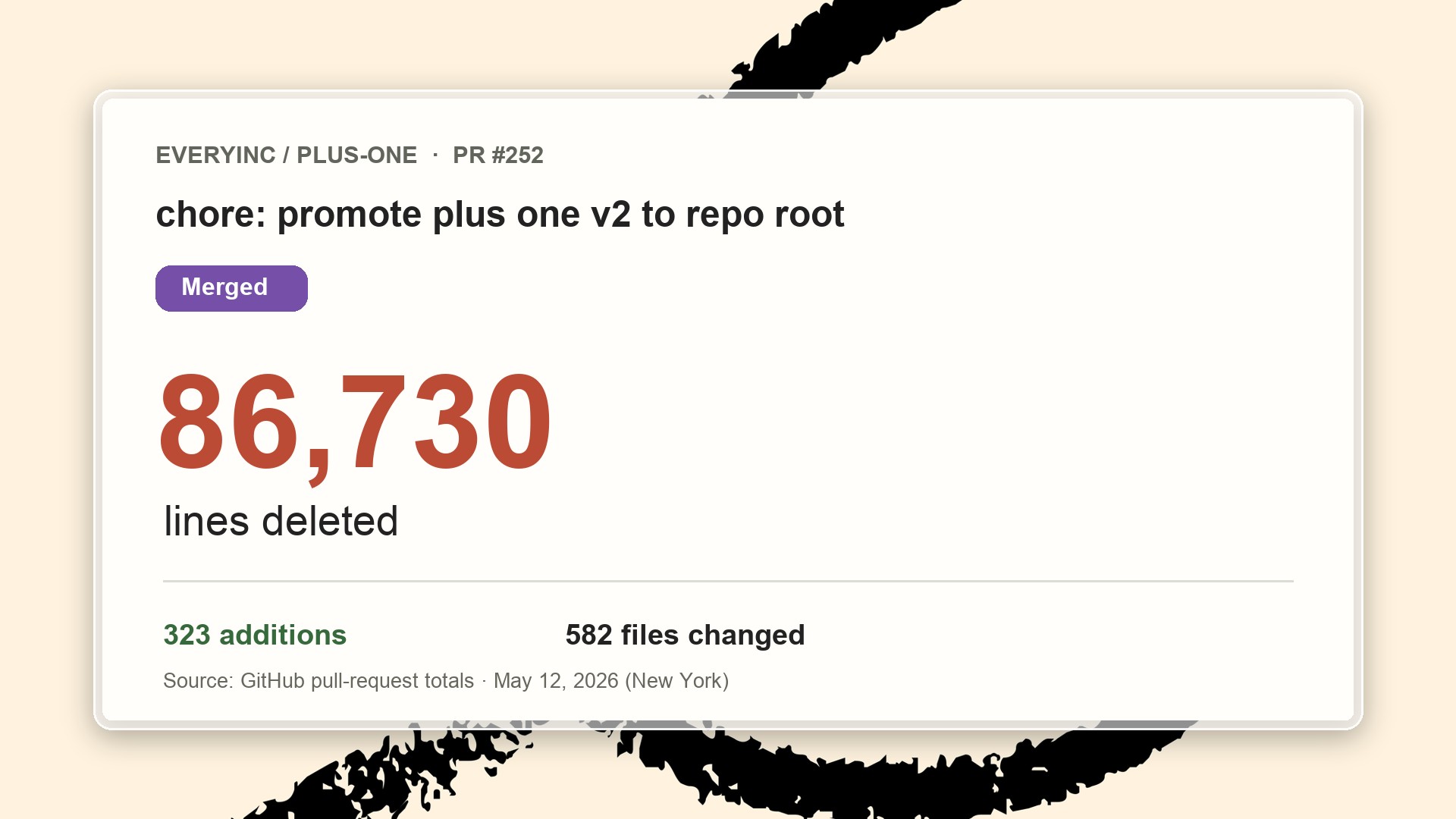
Early in May, I told Dan Shipper and Brandon Gell that Plus One, our personal-agent product, wasn’t working. Soon afterwards, I deleted 86,730 lines of its code from the codebase.
Plus One wasn’t working for a couple of reasons. First, it was too much work to run: Each user’s agent lived on its own cloud computer running OpenClaw, an open-source agent program, and keeping those machines healthy left our small team little time to improve the product. And many people who tried it stopped using it.
We decided to start over, making two changes together: First, we handed over our infrastructure to Anthropic’s Claude Managed Agents, as engineer Paridhi Agarwal detailed in a recent piece. Next, we replaced a fleet of personal agents with one shared agent for the whole company: the Every Agent.
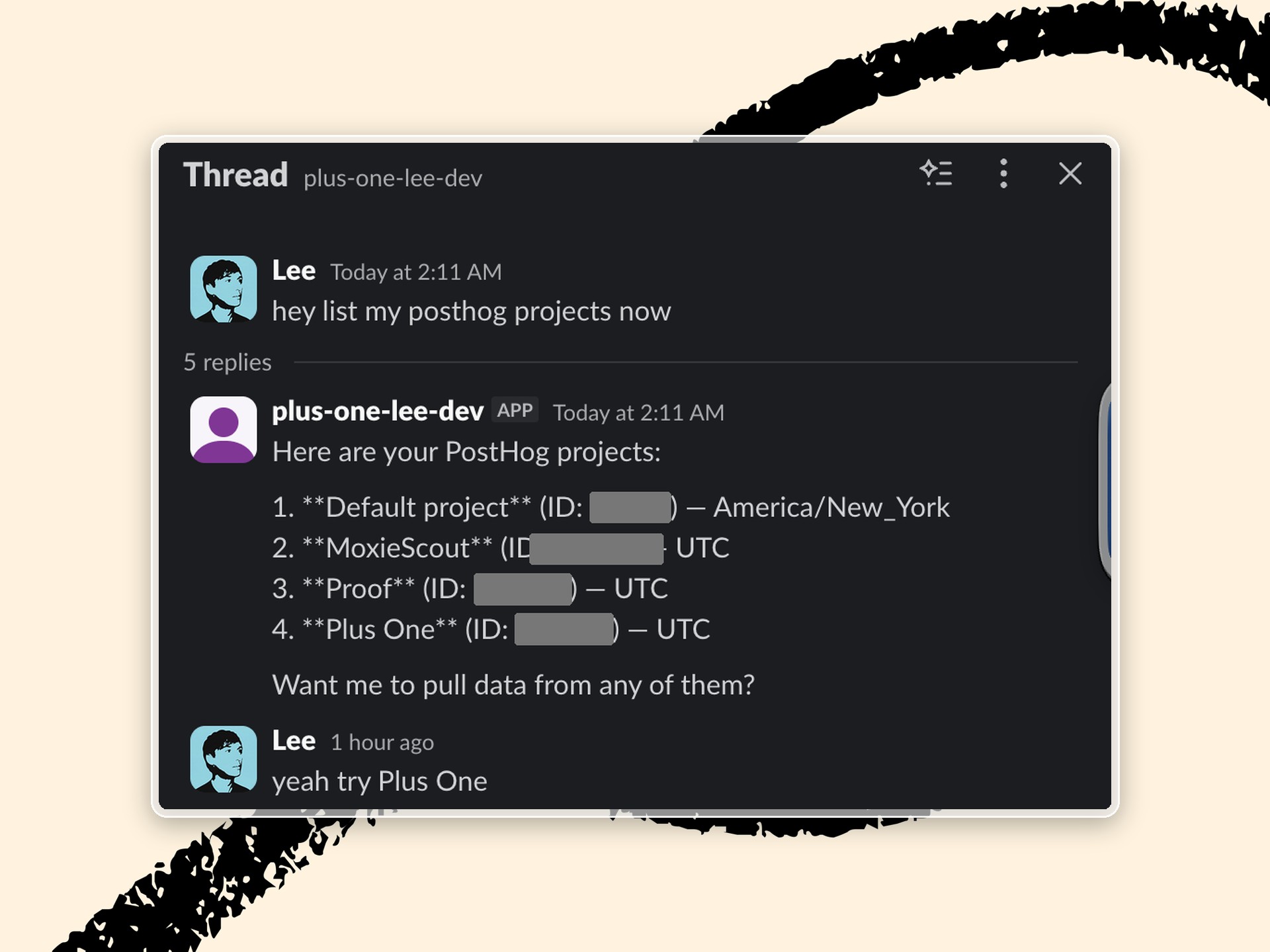
We made that switch not just for infrastructure reasons but for behavioral reasons, too. We’d observed that Plus One was most useful when you borrowed someone else’s agent. Austin Tedesco, our former head of growth, had connected his personal agent to our analytics tool so it could answer questions about growth. Before long, the rest of the team was asking it their growth questions, too.
Plus One also taught us who we were building for. We learned that most people who could benefit from having an agent have little time to tinker and don’t want to pick a model, adjust settings, or fix a broken setup themselves. They wanted us to make those choices.
A single shared agent solved the problems of the personal agent fleet, but it also created a new set of problems. A personal agent depends on three simple assumptions: It talks to one person, uses that person’s logins, and assumes it’s allowed to do anything that person asks for.
Once the agent belonged to the whole company, none of those assumptions held:
- Conversations. @Every was now in Slack threads with half a dozen coworkers talking at once.
- Connections. When someone left the company, the agent’s reports tied to their login stopped running.
- Permissions. It took requests from people who didn’t all have access to the same data.
We had to ask ourselves: How do we design these interactions so they don’t break?
1. Conversations: Help the agent follow a Slack thread
With a personal agent, conversation is simple. You type, the model answers, and you’re done. A Slack thread in a shared channel, meanwhile, might go on indefinitely. Someone comes back to it four days later, three coworkers jump in at once, and half the messages are people talking to each other, not the agent. The model has to work differently to retain large volumes of information across threads and respond appropriately.
To feel like a coworker, a shared agent has to follow the conversation, even when several people are talking at once. Because we knew this was a likely point of failure, we added a translation layer that organizes Slack messages for the model and sends its replies back to the thread.
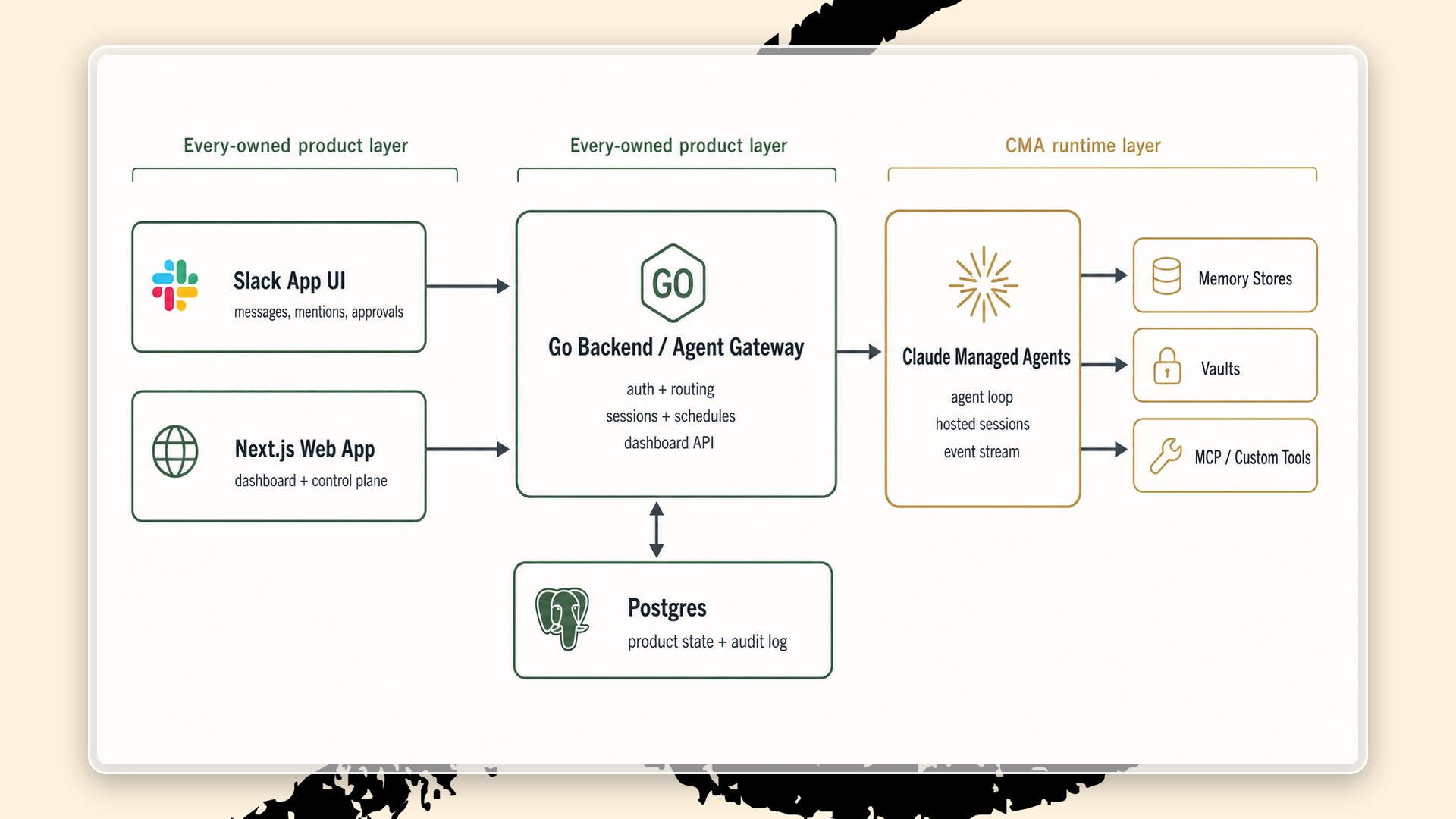
Paridhi, who built most of that layer, set its first rule early on: Every keeps the official record of each conversation in Slack. If Anthropic’s copy is ever summarized or lost, we can rebuild it from the thread.
The translation layer also ensures that the agent follows three basic rules of etiquette:
- Always respond when someone expects a response.
- Say only as much as the situation calls for.
- Never join a conversation uninvited.
At first, @Every would ask you a follow-up question in a direct message, then ignore your answer unless you tagged it again. We changed it to read every message in a thread it’s joined. A small, fast model checks whether each message needs an answer or is meant for someone else. If you tell @Every to stop, it stays quiet until someone tags it again.
Another failure came when someone opened several threads with @Every in the same direct message. The model treated them as one conversation, sometimes answering in the wrong thread or running the same task twice. Paridhi separated unrelated requests so the agent could work on one without mixing it up with another.
One question is still open: When should the agent speak up without being asked? A human coworker paying attention will chime in if they know the answer. We’re still working out how proactive a shared agent should be, and in what situations.
2. Connections: Let logins change without breaking tasks
For an agent to be useful, it has to reach the tools that people need. To report on last month’s revenue, it needs access to Stripe. To catch a new team member up on a project, it needs to read Notion. Each of these connections requires the agent to sign into the tool through someone’s account.
Figuring out the agent’s connections fell to Lee Knowlton, an engineer who joined our team this spring and took it on as his first project. We built our own connections for the 15 tools we use most, like Notion, Stripe, GitHub, and Every’s own products like Monologue and Proof. For the rest, we used an outside service.
The harder problem was keeping those connections working. When everyone had their own agent, a dead login was their own problem. With a shared agent, it could stop other people’s work, too.
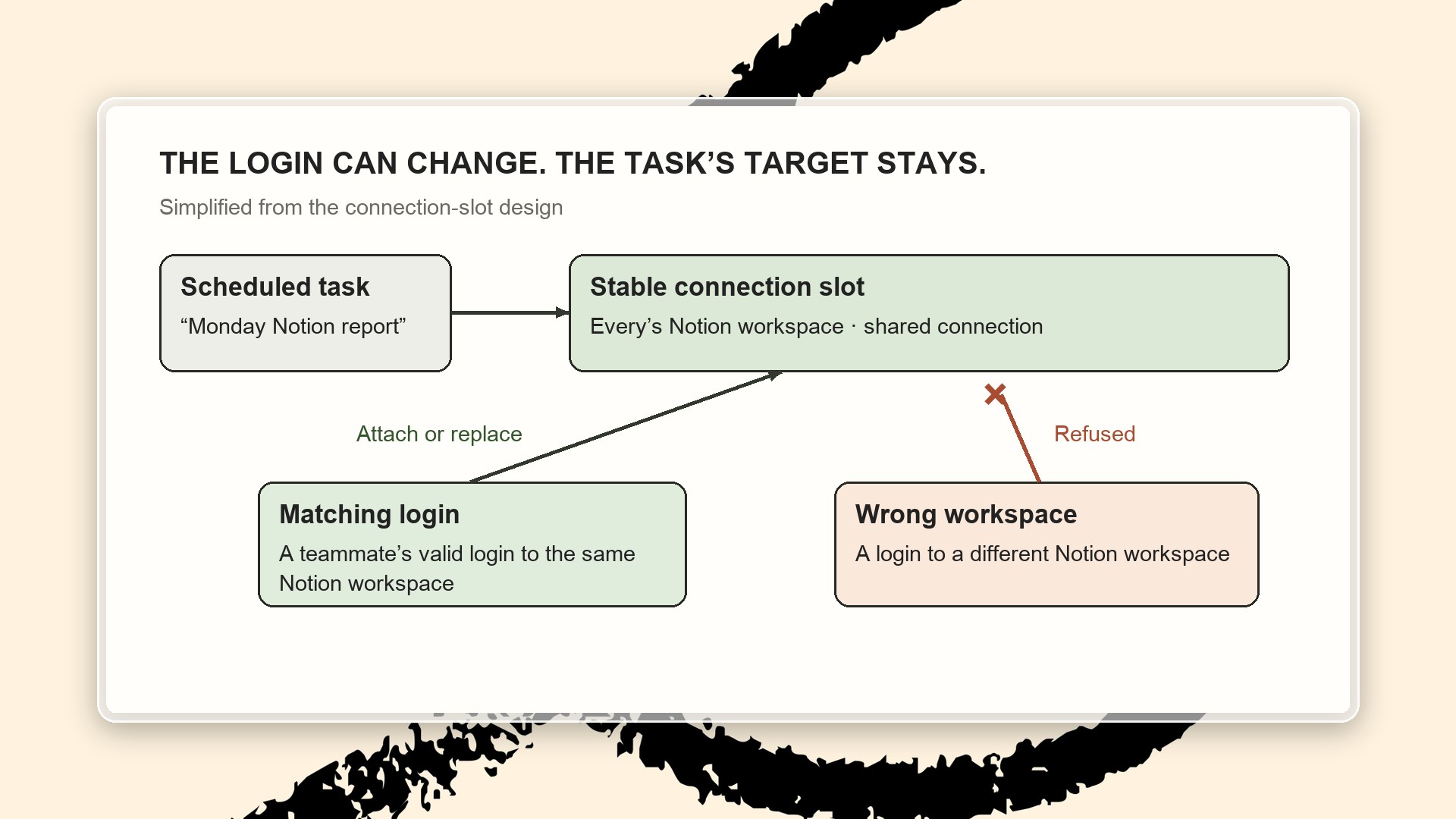
Say you ask the agent to pull a report from Notion every Monday. The task is tied to one particular login. If that login expires, someone has to replace it and relink every task that uses it—a step Lee calls “really ugly.” If the person who set up the task has left the company, nobody else might know how to do it, and the Monday report just stops arriving.
Lee’s solution was to change what a task connects to. A task now connects to a “slot,” where any login that meets the task’s requirement can reside.
When a login expires, or when a team report should run on my account instead of yours, you swap what’s in the slot.
Most people will never see any of this. Their report just arrives on Monday as usual.
3. Permissions: Put the rules in code
When a company agent can reach everything the team has connected, each request raises two questions: Whose access is the agent using, and is the person asking allowed to use it?
People treat Every Agent like a coworker, and human coworkers sometimes bend the rules. If I ask a colleague on the editorial team to show me an old draft I technically don’t have access to, they’ll use their judgment and decide whether to send it over. An agent that can’t make the same kind of exception might seem frustratingly rigid.
So we came up with a small set of rules to guide the agent’s judgment in most situations.
We started with ownership as the first rule. Everything people build with the agent—a skill, a scheduled task—has an owner, and that owner can be an individual or a whole Slack group, like @writers. When someone leaves the company and there’s no obvious successor for a shared workflow, the question goes to a workspace administrator, the same way it would go to a human manager at any company. The manager chooses who inherits the shared workflow. (That authority doesn’t extend to someone’s personal accounts.)
The rules about who can do what live in code, underneath the model, rather than in the instructions the model reads. This way, the model can’t be convinced to bend rules that it shouldn’t. In testing over the summer, the agent sometimes tried to be helpful and edit a skill that belonged to someone else, and the system simply refused.
The same logic applies to consent. Lee found that the agent could skip asking for approval by claiming that the person had already asked for something. The easy fix would have been to make it ask for approval every single time, but that would have made the agent annoying to work with. Instead, the server now checks the agent’s request against what the person wrote in Slack.
Beyond these firm rules, we left the rest to the agent’s judgment, with one test suggested by engineer Will Gathright: How hard would this be to undo? If it’s easy to undo, the agent makes a reasonable call, does the work, and says what it assumed. If it’s destructive or visible outside the conversation—posting to another channel, deleting something—it asks first.
Encoded rules have a cost: They can be reliably wrong. When we moved Every’s skills onto the new permissions system in July, all 24 of them came out private. Skills teammates had built together in public channels suddenly belonged exclusively to individual owners, and everyone else was locked out. One colleague rebuilt a daily growth report from scratch because she couldn’t edit the original. About a week later, Lee manually broadened access to nine of them and changed the default, so anything created in a public channel can be edited by the entire workspace.
Why choose Every Agent?
Every Agent launched publicly on October 6, with conversations, connections, and permissions working well enough for other companies to use it. Lee describes everything up to that point as getting the agent to “a really good start line”—pleasant to work with, mostly doing what you’d expect, and not doing anything annoying.
A good start line isn’t reason alone to choose @Every, though. Slack agents are commonplace now, including products from Anthropic and OpenAI. And once it’s easy enough for anyone to build their own company agent, why choose ours?
Our bet is that people will trust Every’s taste and judgment enough to let us decide how their agent should work. Most people don’t want to spend their day deciding when an agent should join a conversation or what should happen to a report when a colleague leaves. They want to get on with their work.
Those are the decisions we spent this rebuild making. Each new customer gives us more to work through. When we learn how the agent should handle something for one team, we can make it work better for everyone else using @Every.
Willie Williams is the head of platform at Every. To read more essays like this, subscribe to Every, and follow us on X at @every and on LinkedIn.
Stop explaining AI to your team and start showing them. Every Agent does the work in Slack, where everyone can see it, so one good workflow quickly becomes the whole team’s.


Related Essays

 Katie Parrott
 Every Staff
 Kieran Klaassen
A paid Every subscriber gifted you this article. Every is a bundle of writing and tools for making sense of AI, work, and what comes next.
Subscribe to the Every bundle
Comments