


Katie Parrott is a staff writer. She writes Working Overtime and contributes to Vibe Checks, Source Code, and Context Window.

Claude Code Camp: The Workflows Turning One Engineer Into Ten
Demos and tips from our second expert workshop, on subagents
Aug 28, 2025 · 10 min readUpdated Jun 17, 2026

Was this newsletter forwarded to you? Sign up to get it in your inbox.
“What do a jet ski and Claude Code have in common?”
That’s how Sparkle general manager Yash Poojary opened his presentation at the latest Claude Code Camp, our live event series where Every’s engineers share how they use Claude Code in production and answer subscriber questions.
The chat filled with answers: They’re both fast, extra fun with friends, and reckless if you don’t know what you’re doing. It was a joke—but also a sharp metaphor for Claude’s new subagents.
Anthropic only released subagents a month ago, but Every’s engineers are already weaving them into their daily workflows for Spiral, Cora, and Sparkle. (The latter is launching a new feature tomorrow built with techniques we discuss here.)
The lessons are adding up quickly, and not only for the humans. When you’re following the principles of compounding engineering—building development systems that learn from your feedback—every workflow improvement makes the next one easier. Subagents fit perfectly into this philosophy, because each one can learn to apply your standards consistently and get better with every task.
Here are the biggest takeaways from this session of Claude Code Camp, plus demos from our engineers and highlights from the live Q&A.
Key takeaways
- Create subagents (more about them below) when the work repeats. They shine once you spot a task you don’t want to do again.
- Work in parallel, not sequence. Running up to 10 agents at once turns long, linear work into something more like a team tackling tasks in unison.
- Each subagent keeps its own notes. Subagents hold their own memory, so they can carry logs, specs, or architecture notes without cluttering your main session.
- Treat them like teammates. Codify your standards once and the subagents will apply them every time, like a junior engineer who’s already onboarded.
Bland Is the Most Powerful Voice AI in the World

In fact, chances are, you’ve already spoken to it without even noticing. Companies from Fortune 500’s to startups have been using Bland to build AI voice agents for sales, support, and much more. It can:
- Answer phone, SMS, and web‑chat requests 24/7—no hold music, no queues
- Scale to 1 million-plus simultaneous conversations while slashing support costs
- Speak any language and connect to any backend CRM, ticketing, or data source
- Stay on‑brand with guard‑railed reasoning that prevents hallucinations and off‑script replies
Hundreds of enterprises and high‑growth startups already trust Bland to boost CSAT, cut resolution times, and free up agents for higher‑value work.
Curious? Call the number in the image, or Every readers can get started here for free.
What are subagents, and what are they for?
A subagent is a lightweight AI program you can spin up for a specific role. Think of them as separate conversation windows with specialized instructions. Each one has its own system prompt, its own memory, and access to the same tools as Claude Code in general. They can run in sequence or in parallel—up to 10 at once. “Claude started as an individual contributor for you,” explained Dan Shipper, CEO of Every. “With subagents, it’s becoming a team lead. It can now manage a team of its own agents to get work done.”
When to create a subagent
The temptation when you first learn about subagents is to build out a library of 20 or 30 all at once. Dan cautioned against it: “If you do that, you just won’t use them. A better approach is to notice when you’re repeating a task, and create an agent in that moment.”
Kieran Klaassen, general manager of our AI email management tool Cora, shared an example. He needed to add metricsI tracking with Ahoy, something he’d set up before and knew he’d need again. “Normally I’d have to refresh myself on how I did it last time. Instead, I created an Ahoy tracking expert agent. Now Claude knows how to do it every time.” For Kieran, the key is to think of subagents the way a tech lead would think about onboarding: Codify the steps once, so you don’t have to repeat yourself later.
Why subagents are powerful
The strength of subagents is structure. They break work into roles, encode judgment into loops, and carry context forward in ways a single coding session cannot.
- They compound learning. A subagent set up with your standards will improve with each run, like a junior teammate who learns quickly.
- They create feedback loops. An executor subagent writes code; an evaluator subagent reviews it. An argument between two agents surfaces better answers.
- They unlock context. Each subagent holds its own memory, so your main thread stays clear.
- They enforce taste. By applying feedback to future cases, , subagents maintain consistency across projects and reflect your preferences over time.
Patterns emerging in real workflows
Once subagents move from idea to daily use, certain patterns show up again and again. These are the practical shortcuts our engineers have discovered. Each one shows a different way to turn lightweight agents into reliable teammates.
Executor/evaluator loop: One subagent does the work, another reviews it
When you generate code or text with an AI, it tends to be overconfident about its own output. A good trick is to split the workflow into two roles: one “executor” that does the work, and one “evaluator” that reviews it. This creates a natural feedback loop that improves quality.
Danny Aziz, general manager of our writing tool Spiral, showed how he uses this pattern for Spiral’s onboarding screens. His UI engineer subagent takes mockups from Figma and translates them into working React components (a programming framework for building web apps). A second subagent, the implementation reviewer, compares the code against the design and requests revisions. Because each has its own context window, the reviewer isn’t biased by the executor’s memory, and they iterate back and forth until the implementation matches the design.
Opponent processors: Two subagents argue to reach better decisions
Sometimes the best way to reach a good decision is to generate two opposing perspectives and let them argue it out. Subagents are perfect for this because they can each hold a different role or agenda.
Dan showed how he used two subagents to audit his expenses. One agent played “Dan,” trying to justify as many expenses as possible. The other played “the company,” pushing to minimize costs. Claude mediated between them and delivered a balanced report.
Feedback codifier: Learns from your code review comments
AI agents work best when they have access to your past decisions and preferences. By codifying your feedback into a reusable format, you ensure future agents don’t repeat the same mistakes.
Danny demonstrated his feedback codifier agent. After leaving comments on a pull request (a draft of code changes submitted for review), he ran the codifier. It extracted the lessons and stored them in his Claude.md file—a project-specific document that functions like an instruction manual. The next time Claude reviews code, it already knows Danny’s standards.
Research agent: Finds solutions and tradeoffs from similar projects
Before building a new feature, developers often scan open-source projects to see how others solved similar problems. This saves time and avoids pitfalls, but it can be tedious. A research subagent can automate the search and summarize what matters.
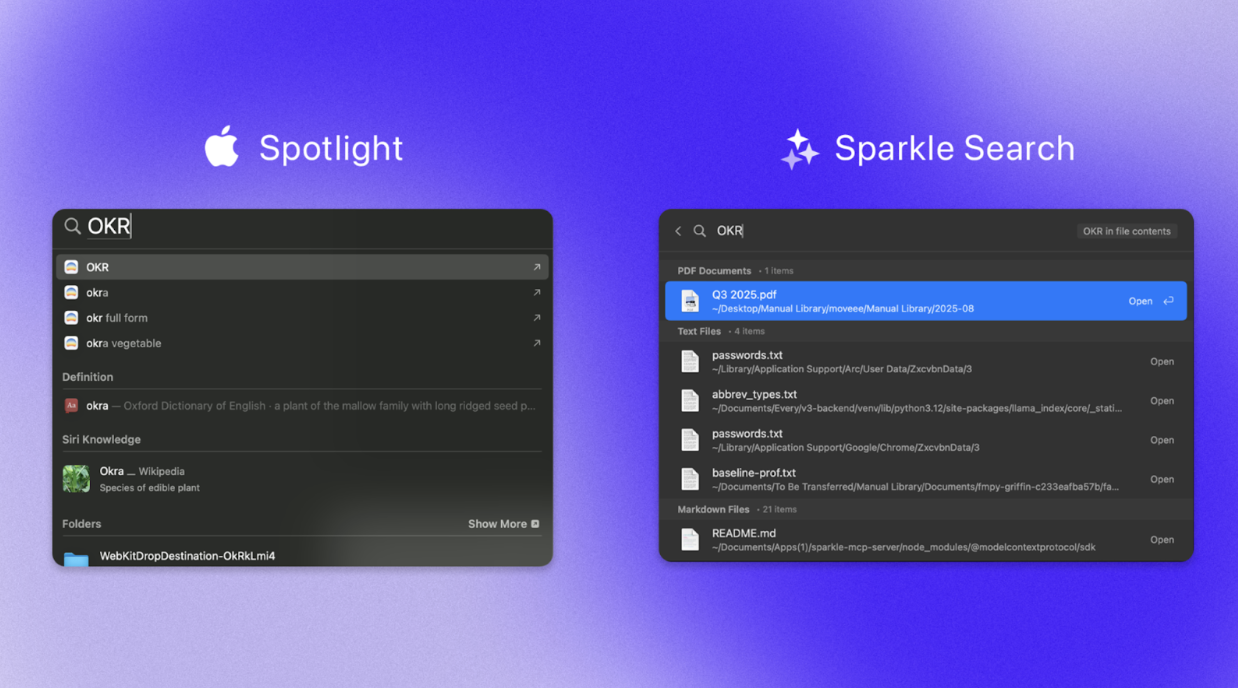
That’s how Yash built the new search feature for Sparkle, the AI-powered file organizer for Mac. Sparkle users kept asking, “How do I find my files once they’re organized?” The research agent produced a report that mapped how other apps approached indexing and performance indicators like search speed, flagged trade-offs, and highlighted best practices. Work that would have taken Yash days of exploration took hours instead.
The result is Sparkle Search: a faster, more reliable way to find files in Sparkle, born from the same workflow we use to ship code every day. Try it out and update Sparkle to 1.5.7 when it launches tomorrow. We're using this ourselves daily and would love feedback on what works (or doesn't) for your workflow.
Log investigator: Digs through error logs and returns only what matters
Error logs can be long and messy, but they usually contain the key to solving a bug. Subagents can analyze the full log in their own memory (as opposed to a shared memory) and return only the relevant details.
Kieran showed his log investigator agent. When something breaks, he asks the agent to parse the logs, identify what’s going wrong, and report back with the key details. “Sometimes you just want a clean slate in your terminal,” he said. “The log investigator can do the digging and bring back what matters.”
The Q&A
We wrapped the session with a live Q&A. Here’s a selection of the most useful ones, including a few we didn’t have time for during the event.
Become a paid subscriber to Every to unlock this piece and learn the answers to nine questions about:
- When to use slash commands instead of subagents
- How workflows compare to subagents
- Project agents versus personal agents
- Parallel execution, token usage and cost, feedback and code reviews, and more
Thanks to our Sponsor: Bland AI

In fact, chances are, you’ve already spoken to it without even noticing. Companies from Fortune 500’s to startups have been using Bland to build AI voice agents for sales, support, and much more. It can:
- Answer phone, SMS, and web‑chat requests 24/7—no hold music, no queues
- Scale to 1 million-plus simultaneous conversations while slashing support costs
- Speak any language and connect to any backend CRM, ticketing, or data source
- Stay on‑brand with guard‑railed reasoning that prevents hallucinations and off‑script replies
Hundreds of enterprises and high‑growth startups already trust Bland to boost CSAT, cut resolution times, and free up agents for higher‑value work.
Curious? Call the number in the image, or Every readers can get started here for free.
 Create a free account to continue reading
The Only Subscription
You Need to
Stay at the
Edge of AI
The essential toolkit for those shaping the future

"This might be the best value you
can get from an AI subscription."
- Jay S.
 Every Content
 AI&I Podcast
 Monologue
 Every Agent
Join 100,000+ leaders, builders, and innovators

Already have an account? Sign in.
What is included in a subscription?
Daily insights from AI pioneers + early access to powerful AI tools



 Front-row access to the future of AI
 In-depth reviews of new models on release dayPlaybooks and guides for putting AI to workPrompts and use cases for buildersIn-depth reviews of new models on release dayPlaybooks and guides for putting AI to workPrompts and use cases for builders
 Bundle of AI software








 Katie Parrott
 Every Staff
 Kieran Klaassen
Comments