


Dan Shipper is the CEO and cofounder of Every. Every week he explores the frontiers of AI in his column, Chain of Thought, and on his podcast, ‘The Every Podcast’.

How GPT-5.6 Changes Knowledge Work
Don’t do your work. Tend your loop.
Jul 10, 2026 · 6 min readUpdated Aug 5, 2026

TL;DR: GPT-5.6 is the first model I’ve used that can reliably run whole loops of knowledge work, not just help with individual tasks. Your job turns from doing the work to tending the system that does it. If you want to try this for yourself, we’re open-sourcing a prompt and repository called Tend so you can try working this way in ChatGPT Work.
GPT-5.6 heralds a new way of doing knowledge work.
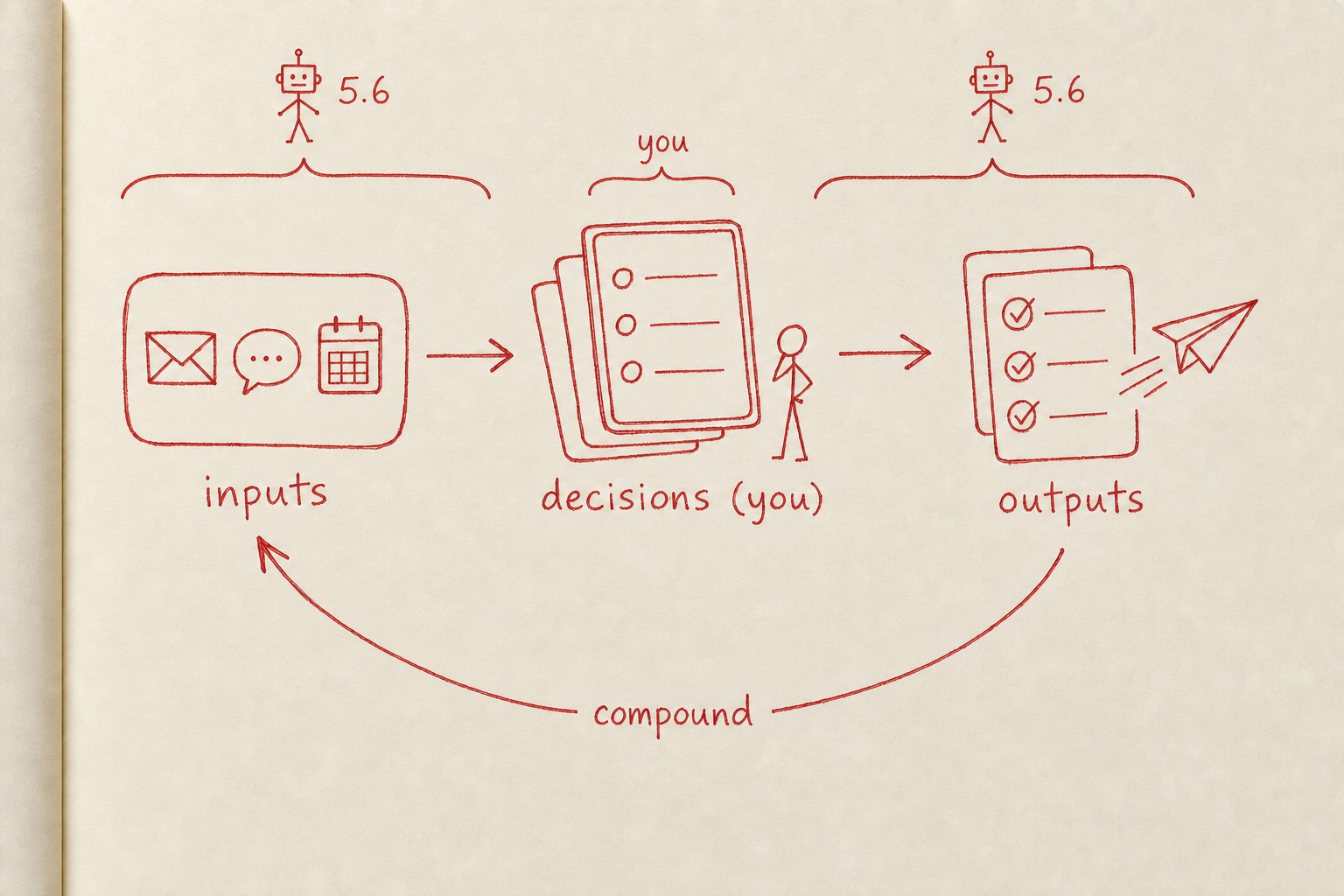
Instead of using AI to complete one task at a time, you build a system that scans the available information, turns it into proposed decisions, and carries out the ones you approve. Over time, the system compounds your feedback to do more and more on its own.
This changes your job. It requires you to see your work as—dare I say it—a loop. You go from doing all of the work yourself to tending the system that does it for you:
Take email. I used to go through my inbox like this: Email comes in, I read it, I reply, I archive. (Or, email comes in, I open it, I close it, I wait several weeks, I open it again, I archive it.)
With GPT-5.6 Sol in the new ChatGPT Work app, formerly known as Codex, the process looks very different. GPT-5.6 Sol watches my inbox, decides what deserves my attention, does any necessary research, and presents each email with a concise summary and proposed reply. I either approve the draft or use Monologue to dictate what I want changed. Then I move to the next email.
At the end of each sweep through my inbox, the agent derives my preferences from my revisions and decisions and remembers them for next time.
It’s no coincidence this sounds like compound engineering; it’s the same philosophy—just applied to knowledge work. I’ve been writing about this shift for a few years: In early 2024 I argued that much knowledge work would become managing agents, and later that it would look like tending to a garden—creating the conditions for work to happen, rather than doing everything yourself directly. This isn’t a new way of working: Managers and entrepreneurs have done it for decades, and as models improved over the past year, programmers adopted it, too. Now it’s knowledge work’s turn.
This approach won’t work for every kind of knowledge work, and it’s still early. But where it works, it creates a remarkable kind of leverage.
What makes GPT-5.6 Sol and ChatGPT Work different
GPT-5.6 Sol crosses the threshold that makes a continuous knowledge-work loop practical. It can scan your sources, identify what’s relevant, carry out approved work, and build custom tools for itself as needed. It can do all of this reliably even if you can’t code—and it can explain all of this to you in a way that’s understandable.
It’s also fast and cheap enough that you can iterate rapidly—a crucial requirement for non-technical users who are going to make mistakes and need to see the results of a run before knowing if it’s good.
Sol inside of ChatGPT Work is even better: Its in-app browser lets it use any website alongside you, and its powerful computer use function lets it operate any app on your machine. It also has Chronicle, a feature that periodically screenshots your computer to learn who you are and how you work, so it improves over time.
Fable can do all of the above, but it’s too expensive, too powerful, and too slow for non-technical users. It often speaks in its own language that even programmers have a difficult time understanding. The Claude desktop app can also do much of this, but it’s hampered by hard-to-understand security controls and differences between Claude Code and Cowork’s features and capabilities. 5.6 and ChatGPT Work just…work.
How to see the loops in your work
Most knowledge work happens in a three-step loop:
- Gather and make sense of information
- Make a decision and take action
- Learn from the result
These loops predate AI. A product manager reviews feedback and data, chooses priorities, watches what happens after shipping, and carries the result into the next planning cycle. An editor reads a draft, gives feedback, notices recurring problems and accepted suggestions, and then edits with that in mind. A support lead handles a recurring problem, sees whether the answer sticks, and updates the playbook or flags it to the product team.
With GPT-5.6 in ChatGPT Work, the model takes on more of the work inside the loop. You still make the key decisions; you still choose what it pays attention to and how it improves over time. But your job now is to tend the loop.
Examples of loops you can tend
To make this clearer, here are some examples of the kinds of loops I’m using GPT-5.6 in Codex to tend.
- Hiring: GPT-5.6 reviews applications, referrals, and candidates’ public work; looks for evidence of fit, craft, and a credible path of trust; then presents the strongest candidates with its reasoning and a proposed next step.
- Running Every: GPT-5.6 reads meeting transcripts, Slack conversations, and company metrics; identifies decisions, open questions, risks, and unresolved commitments; then proposes the follow-ups that deserve my attention.
- Furnishing my apartment: GPT-5.6 scans listings on Facebook Marketplace using my constraints and taste, compares price, condition, distance, and quality, and presents the best options with a draft message to the seller.
- Editorial planning: An editor gathers news, Slack discussions, and unfinished drafts; decides what belongs in an issue; publishes it; watches what readers engage with; and uses that response to plan the next issue.
- Customer research: A researcher gathers interviews and support messages, identifies recurring needs, proposes a product change, watches how customers use it, and turns the results into the next research question.
- Consulting delivery: A consultant gathers client conversations and project data, identifies the next priority, produces a recommendation or deliverable, sees how the client responds, and folds that result into the next round of work.
Tend your work loops
To help get you acquainted with how your knowledge work happens in loops, we built an experiment called Tend. It’s a prompt and an open-source repository that will let you build loops for your work, whatever that might be.
Here’s a screenshot of me using Tend to keep track of what’s happening at Every:
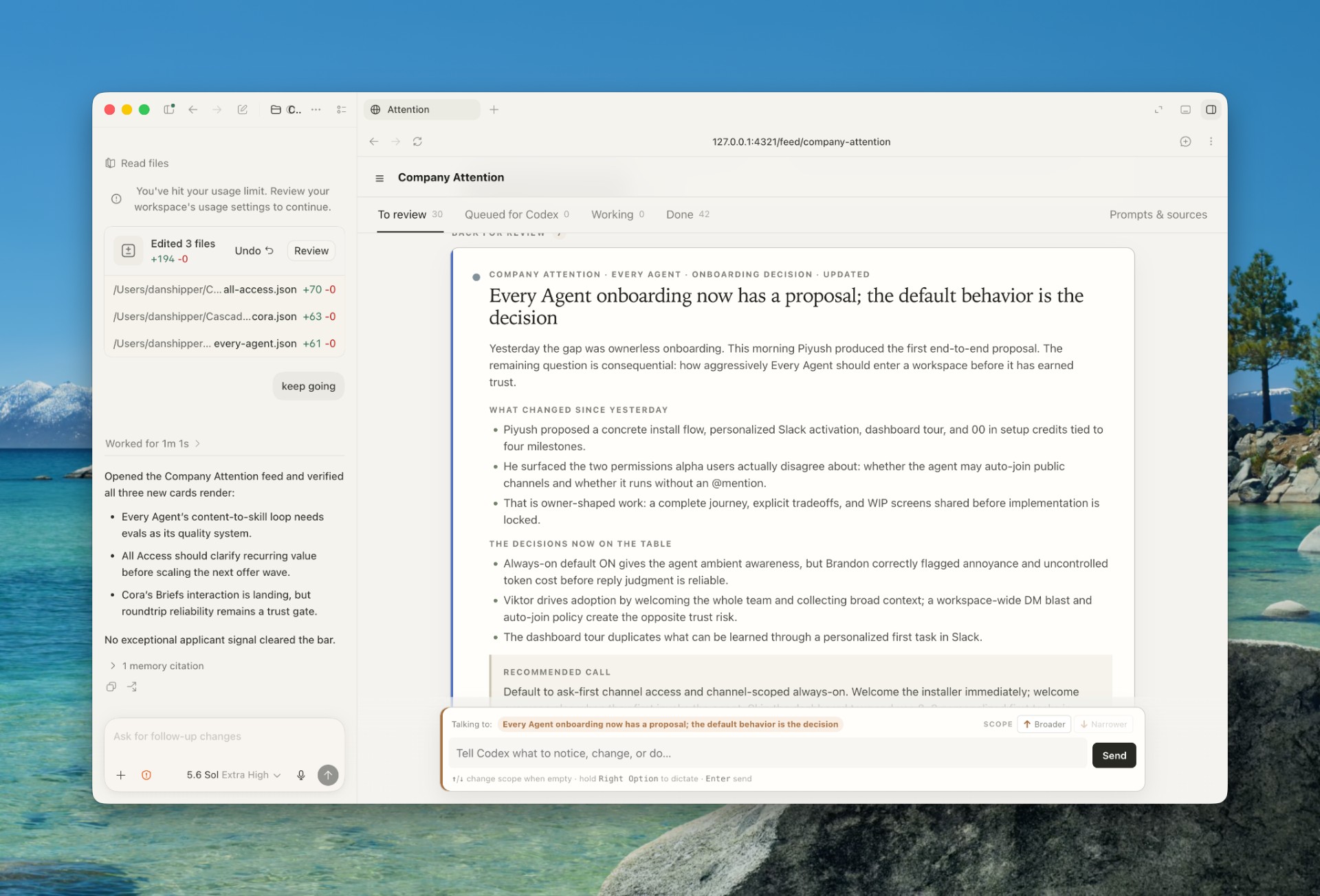
You can use Tend to tend any loop you want to experiment with, from your inbox to a hiring pipeline or customer service queue.
You can copy the prompt from GitHub, connect Cora, Gmail, Slack, or any other information source, and spend a few minutes teaching Tend how your inbox works.
Tend is open-source, so you can rewrite its instructions, add your own rules, or adapt the pattern to another recurring part of your job. We’re releasing it as an experiment. It’s meant for you to play with and learn from—but we’re not supporting it as an app, and we can’t promise stability or improvements.
Start by teaching Tend what deserves your attention. Then notice what happens: The inbox gets easier, the instructions get better, and another loop in your work begins to reveal itself.
Dan Shipper is the cofounder and CEO of Every, where he writes the Chain of Thought column and hosts the podcast AI & I. You can follow him on X at @danshipper and on LinkedIn.
To read more essays like this, subscribe to Every, and follow us on X at @every and on LinkedIn.
We build AI tools for readers like you. Write brilliantly with Spiral. Organize files automatically with Sparkle. Deliver yourself from email with Cora. Dictate effortlessly with Monologue. Collaborate with agents on documents with Proof.
For sponsorship opportunities, reach out to [email protected].
The Only Subscription
You Need to
Stay at the
Edge of AI
The essential toolkit for those shaping the future

"This might be the best value you
can get from an AI subscription."
- Jay S.
 Every Content
 AI&I Podcast
 Monologue
 Every Agent
Join 100,000+ leaders, builders, and innovators

Already have an account? Sign in.
What is included in a subscription?
Daily insights from AI pioneers + early access to powerful AI tools


 Front-row access to the future of AI
 In-depth reviews of new models on release dayPlaybooks and guides for putting AI to workPrompts and use cases for buildersIn-depth reviews of new models on release dayPlaybooks and guides for putting AI to workPrompts and use cases for builders
 Bundle of AI software






 Katie Parrott
 Every Staff
 Kieran Klaassen
Comments