
Our AI writing partner Spiral is live on Product Hunt. We’d be grateful if you could upvote it and leave a comment about how you use it.—Danny Aziz
Was this newsletter forwarded to you? Sign up to get it in your inbox.
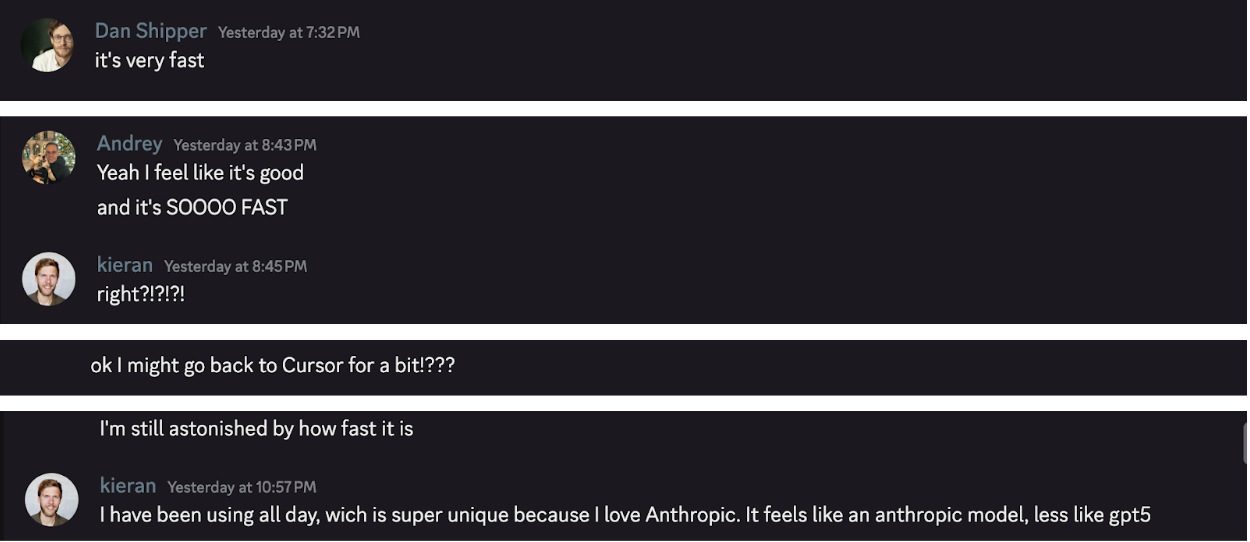
At Every, we measure excitement for a new AI product by the velocity of messages in our #early-access channel on Discord.
We got early access to Cursor 2.0—a new version of the OG AI code editor—a week ago, and the vibes were…polite. People were curious, interested, but not exactly fired up. Then, less than 24 hours ago, we got our hands on the new LLM Cursor also released today, and the group chat has been popping off. The excitement for the new model seems to be rubbing off on the code editor as well.
What’s new
Cursor launched two things today:
Cursor 2.0: A refreshed version of its AI code editor, with a push to add more of the primitives of command line interfaces (CLIs, or the text-based tools developers use to type commands directly, rather than clicking around in a graphical editor) like Claude Code directly into the interface. Cursor 2.0 includes a new agent view where you can spin up and manage agents in a three-panel layout: agent status on the left, AI thought process in the middle, code on the right. (It resembles an inbox of sorts, reminiscent of Codex on the web; we dig into this interface more below.)
Composer 1 Alpha: Cursor’s very own LLM that is, indeed, as my colleagues said, very, very fast. The model is available inside Cursor 2.0 as well as its CLI. It will cost the same as GPT-5 (which, as we noted in our GPT-5 Vibe Check, is priced to make rivals sweat: GPT-5-mini undercuts Google’s Gemini 2.5 Flash, and GPT-5 Standard comes in at one-twelfth the cost of Claude 4 Opus).
Our day-zero verdict:
Cursor 2.0 is a solid evolution of the integrated development environment (IDE) experience for 2025: Its agent view prioritizes what programmers actually spend time on (delegating to and managing agents) rather than reading and writing code by hand. It also has a lot of bells and whistles—like the ability to put multiple models on the same problem simultaneously and an integrated web browser so AI can test out its code end-to-end. But because Cursor 2.0 can do anything, it feels overwhelming, and if you’re coming back from using a CLI, it’s going to feel hard to use.
Composer 1 Alpha is fast, capable, and genuinely fun to use—but inside Cursor 2.0, it feels limited by how cluttered the interface feels. The fact that Cursor has its own model though makes Cursor genuinely interesting again, and we’ll keep coming back to see how it improves over time.

Build a project in a single day
AI can feel abstract until you build something real—and tools “made for programmers” can stop you before you start. Spend one day with Every’s Dan Shipper to get acquainted with the best tools on the market, assign your AI agents real tasks, and ship something live. Claude Code for Beginners runs Nov. 19, live on Zoom. You’ll leave with a project, a reusable workflow, and a head start on building the agentic apps that will populate the future.
The Reach Test
Dan Shipper, the multi-threaded CEO
Cursor 2.0 🟥
It’s a good step forward for Cursor, but it would have to be significantly better than Codex CLI or Claude Code to get me to switch back. As it is, the interface feels too cluttered, and GPT-5 and Sonnet 4.5 don’t seem to run with as much autonomy as they do in the CLI. I do like the integrated browser and the ability to read code when I need to, though I still think code feels like too much of a first-class citizen.
Composer 1 Alpha 🟨
It’s super fast, which is great. But it doesn’t feel as smart as Sonnet 4.5 and GPT-5 in my side-by-side tests. A highly technical programmer who understands exactly what he or she wants would probably love it, but if you’re diving into a codebase that you don’t fully understand (like me), you wouldn’t reach for it.
Kieran Klaassen, the Rails-pilled master of Claude Code
Cursor 2.0 🟨
I went from red (haven’t touched it since version 0.45 in February) to yellow because I’m genuinely curious if I can get it into my groove. I’m an engineer, so an IDE should feel natural, but after living in the CLI it suddenly feels clunky. It might be a skill issue that I need more time to figure out. The UI still fights me: Command+W closes the wrong pane, Command+T nukes my agent context, and I’m drowning in redundant controls. But I have a feeling that I shouldn’t disregard the tool: Agent mode is there, and the power features like parallel agents in work trees are surprisingly smooth. I’m still on the fence but intrigued to see where this goes.
Composer 1 Alpha 🟩
It just feels good. Fast enough that it makes me more productive—despite being less smart than Sonnet 4.5, because speed keeps you in flow, which is its own kind of intelligence. Since I typically know exactly what I want from the model, Composer is pretty good at executing without making me wait. It’s perfect for iterative work, which is what Cursor is built for. This model will be great for a lot of people.
Andrey Galko, the cautious vibe coder
Cursor 2.0 🟨
I’m pretty sure that IDEs are the way for the future of coding to go—they’re easier to use, and there are a lot of useful features that are easily accessible. CLIs feel clunky for me. It’s nice that Cursor has added new features (that we’ll discuss below) and has a very fast model. But I’d like to see them integrating with the Codex CLI and Claude Code like its competitor Zed does, instead of locking people in on their platform. I still use Cursor, but mostly to run CLIs in its terminal.
Composer 1 Alpha 🟨 🟩
The model is fast, and I can say that it gets more right than wrong. So I’m optimistic about where it could bring us and how others may try to start competing with it. But I’m not necessarily going to switch from the slower Codex CLI. It’s still more well-rounded, and it manages to go that extra mile that Composer shies away from (without overdoing it like Claude did at some point.)
Putting Cursor 2.0 through its paces
Cursor 2.0 features an inbox-like interface with an agents panel on the left—where you can see all the agents that are currently running, along with the status of completed updates—the AI’s thought process in the middle, and code on the right. This view represents a new style of coding, one focused on delegating to and managing agents.
Cursor 2.0’s interface is reminiscent of Codex on the web. It builds on a trend that Claude Code sparked a half year ago, when it deprioritized the code itself to focus on prompting agents to execute for you. The primitives were already there—Cursor just seems to have cherry-picked the best ones.
The upside is power: You can do almost anything from one place. The downside is... the same. Having everything in one interface can feel overwhelming. It demands spending time configuring a whole new workflow, and there’s friction in doing that when it’s not yet clear that it’s substantially better than existing tools. And when using OpenAI or Anthropic models, the experience is less autonomous than expected. The agent stops often, suggesting that the harness—or the layer of software that connects the model to the application it’s being used inside of, in this case, Cursor 2.0—isn’t quite there yet.
Cursor 2.0 did not, as we alluded to in the introduction, catch our team’s fancy at once. Kieran questioned the choice to make it an IDE. Claude Code-pilled as he is, he prefers the simplicity of coding in a terminal. And Danny Aziz, general manager of Spiral, was turned off from trying the product out at all because “being inside an IDE is so Q1 2025.” But the excitement around Composer 1 Alpha has started to chip away at some of their skepticism. “There are definitely good ideas in there, especially the agent mode,” Kieran says. “I need more time to find a workflow…especially with the new model, the speed feels great.”
Here’s what’s new in Cursor 2.0—what the team liked, and what they’re still not sold on.
A powerful agent trapped in a busy interface
Kieran, who has been coding inside a terminal for a while, says that when confronted with the IDE, he feels overburdened. “It feels like I’m learning to ride a bike from zero, which is not necessarily a bad thing, but it’s a lot,” he says.
He likes the feel of Cursor’s new agentic system but can’t help but find the interface cluttered. For example, there’s a feature where the agent can create a pull request for you—but there’s also a separate button that says ‘Create pull request.’ “There are many buttons that I need to press—I want the agent to just do it,” he says.
Another feature Kieran found unnecessary was “Keep All.” It’s a button that saves every change the agent suggests to your code—basically a one-click “accept everything.” But as Kieran pointed out, he already uses git for version control and can restore any point in the conversation if needed.
He also noted that it’s hard to tell which panel is active inside Cursor (he typically has three panels open). Kieran would prefer something more like Warp, which highlights the active window with a small notch at the top and makes selections easier to see.
All the same, Kieran noted that Cursor’s ability to pull in relevant context is still excellent—better, in his view, than Claude Code running inside Cursor. “[Context has] always been their strength,” he said, “so it’s fun to see that Claude hasn’t caught up.”
Overall, though, he finds the IDE confusing because it represents conflicting philosophies of what the future of coding with AI is: “One part, there are buttons everywhere, the other an agent can do everything.”
Test multiple models in one go
Developers can now run multiple AI agents at once, each working on different parts of a project, each called a “work tree.” This would be the equivalent of a group of interns each working on a different section of this piece, all reporting back to me at the same time.
Kieran thought this was a clever way to test models and try out ideas quickly. Here’s what that looks like inside Cursor, while using the agent-only view. In the bar at the top, you can see that Kieran ran the same task on three different models—Composer 1 Alpha twice and Grok Code once:
When Andrey used the same feature with both the agent and code editor open, the interface looked like this:
His main gripe: When switching between different worktrees in the agent view (on the left), the code editor (on the right) didn’t follow along automatically—he’d have to make the switch manually. That said, Andrey’s been testing it over the past week and says the Cursor team has already made noticeable improvements to the interface.
The AI reviewer that cares a little too much
In the new version of Cursor, as a developer makes changes to code, an AI agent reviews them automatically. Kieran was impressed as it fits neatly into his philosophy of compounding engineering, where small improvements build on each other over time.
Andrey sees the appeal, too, especially because it can run as a “commit hook”—a final check that catches problems right before you save your work to the codebase. It’s a clever feature in theory, but he’s not entirely sold because the AI tends to highlight details like trivial formatting issues and style choices. “Sorry, we live in an era of fully disposable code written by AI,” he says. “All the nitpicking makes no sense anymore.”
See the plan before the agent starts coding
The new Cursor agent has a “plan mode” that shows you what it’s about to do before it does it. You can review the to-do list, tweak it, and then let the agent run. Kieran liked this because it’s similar to how he works in Claude Code, and he can see his to-do’s laid out clearly in Cursor (on the right).
Debug websites without leaving Cursor
Cursor now has a built-in web browser, complete with the same developer tools you’d find in Chrome—those panels that let you inspect a webpage’s code, tweak the layout, and see how it behaves in real time. You can connect it to your Chrome browser or launch a new tab right in Cursor, inspect elements on a webpage, and even add them directly to your conversation with the AI. Instead of switching between windows to see your code and test it in a browser, everything lives in one place.
Andrey found the feature genuinely useful, especially for design work, where you’re constantly adjusting how things look. But he ran into a few bugs: When switching between the agent interface and the normal editor, the browser tab would occasionally disappear.
Putting Cursor’s new model through its paces
Tom Cruise had Renée Zellweger—and all the rest of us—at hello in Jerry Maguire, and Cursor had Kieran at the name “Composer 1 Alpha”: “I do love the name…it’s clearly a reference to the first glimpse of Cursor being agentic when Ian Huang built Cursor Composer as an experimental feature after Sonnet 3.5 launched, inspired [also] by Artifacts from Claude—that was a major step up in AI development.” (Kieran is also, incidentally, a music composer.) Here’s what Cursor’s Composer said after hello:
Faster models that can change how you work
Composer 1 Alpha is fast. It’s the first thing that stood out to Kieran, Andrey, and Dan when they each tried it on their own. Speed is a dimension of intelligence; in other words, for intellectual output to be useful, it must occur within a meaningful timeframe. To take an extreme example, if Einstein took centuries to develop his theory of relativity, he would literally never have done it.
As Kieran pointed out, we already have “pretty good thinking models” like Sonnet 4.5, Opus 4.1, and GPT-5 Codex, but they are “pretty slow.” He says this cleaves open an interesting space for faster agents: those quick enough such that you can spin up five at once, compare their results, and pick the best, especially for simple coding tasks like merging branches or resolving conflicts.
“Waiting on agents to finish is a waste of time,” he says. “A fast model makes you more productive because it just does more things and makes you less distracted.” He positions Cursor’s model as a competitor to Haiku 4.5, which he already uses for lightweight, everyday development tasks.
Curious about which was faster, Kieran ran an A/B test between Composer 1 Alpha and Haiku 4.5, using his changelog slash command (a shortcut that asks the model to summarize what’s changed in the code since the last update). Composer took 45 seconds to complete the task, while Haiku finished in 29. Even though Composer generated tokens more quickly, Haiku got to the finish line first—and did it with less than half the tool calls.
Andrey has a more discerning take on how much the speed really matters: “Speed is great, but we already produce too much disposable code,” he says. “Speed does not help us make better products. Ultimately it’ll just create much more trash.” In his view, the bottlenecks coalesce in places like ideation where AI isn’t good at (at least not yet) and a human in the loop is needed, not in the speed of code generation.
Creative, agentic—and a little forgetful
Anyone who knows Kieran knows just how Claude Code–pilled he is. He loves Anthropic and the tools they make with a nigh unmatched fervor, so you can imagine our surprise when he announced he’d been using Cursor’s new model all day. Kieran usually bounces off new tools fast if they don’t impress him (he’s a tough man to please), and this week he was already under pressure prepping for an upcoming launch for Cora.
What caught his attention about Composer 1 Alpha was how creative and agentic it felt. In one session, it kept working inside Cursor 2.0. He never had to prompt it with a “keep going,” like he often does with GPT-5.
He also spotted a familiar—and annoying—tendency from Claude Code: Composer’s focus on backward compatibility, i.e., making sure new code plays nice with what’s already there.
After spending more time with it, Kieran found that Composer 1 Alpha’s code quality didn’t quite match up to Claude’s. He described it as a “great conversational and vibe code model”—good for agentic work but one that can occasionally lose track of important details that Sonnet 4.5 can handle. It’s also less precise at following directions, and not ideal for long-running background tasks where you just want the best possible result, no matter how long it takes.
UI is not the model’s strong suit
The other area where Cursor's model showed its limits: UI generation. Kieran found Sonnet 4.5 produced noticeably better results. Here's a side-by-side comparison:
Andrey had a similar experience. Composer 1 Alpha handled small updates well, but when he asked it to overhaul the UI of a bigger part of the product, the code worked but the output looked rough. He adds, “But it’s perfect when you’re not technical at all and want to do copy updates, [or] some visual tweaks.”
A step forward—but not quite where we’d like to be
Cursor 2.0 feels like a step toward the future of coding—one where developers spend their time managing agents—but it’s still learning to get out of its own way. Composer 1 Alpha, on the other hand, already feels alive: fast, focused, and fun. If Cursor can bring that same energy to its interface, it might just win us back from the CLI.
Rhea Purohit is a contributing writer for Every focused on research-driven storytelling in tech. You can follow her on X at @RheaPurohit1 and on LinkedIn, and Every on X at @every and on LinkedIn.
We build AI tools for readers like you. Write brilliantly with Spiral. Organize files automatically with Sparkle. Deliver yourself from email with Cora. Dictate effortlessly with Monologue.
We also do AI training, adoption, and innovation for companies. Work with us to bring AI into your organization.
Get paid for sharing Every with your friends. Join our referral program.
For sponsorship opportunities, reach out to [email protected].
The Only Subscription
You Need to
Stay at the
Edge of AI
The essential toolkit for those shaping the future
"This might be the best value you
can get from an AI subscription."
- Jay S.

Join 100,000+ leaders, builders, and innovators

Email address
Already have an account? Sign in
What is included in a subscription?
Daily insights from AI pioneers + early access to powerful AI tools





Comments
Don't have an account? Sign up!