
Vibe Check: Cursor 3.0 Bets Big on Agent Orchestration
The AI-native IDE is now becoming an agent-orchestration tool. Will it work?

There’s a particular awkwardness when a well-loved product stops being what it was, but hasn’t yet become what it wants to be. Cursor 3.0—a totally rebuilt version of Cursor centered around agent-orchestration—out today, is in that weird in-between stage: There are many promising early signs, but it’s not yet mature enough to merit a switch.
Cursor helped create the AI-native integrated development environment (IDE). It was the product that made “coding with AI in your editor” feel like a genuine category. But the thing that made them a category leader has turned out to be constraining.
The rise of Claude Code shifted the dominant coding paradigm away from pair programming—which requires a code editor—toward agent delegation and orchestration—which doesn’t. That left Cursor in a tough spot.
Do they satisfy their core IDE audience and continue building on top of an editor? Or do they start from scratch and build an agent-orchestration tool like Claude Code, Codex, and Conductor?
With Cursor 3.0, they’ve decided to take the plunge toward the latter: This release is a rebuilt product made for dispatching, monitoring, and managing AI agents rather than manually writing code. We’ve been testing it internally for about a week, and there are a lot of promising signs. It’s extremely fast and resource-light, it has an impressive local-to-cloud programming system, and its built-in model, Composer 2, is quick, smart, and concise.
But as a product, it’s still too early in its lifecycle to be a serious contender against the more mature agent orchestration offerings from Anthropic and OpenAI.
The question that kept coming up during our testing was, “Who is this for?” Power users who already work in Claude Code or Codex won’t use a new agent orchestration layer unless it’s 10 times better than what exists, because they already have one that works well. And existing Cursor users who love the IDE are likely to be upset that it has been deprioritized.
That’s why we believe Cursor is in an awkward in-between stage. They’ve made the right strategic move to prioritize agent orchestration. But it will take some time before what they have is truly competitive. Their team seems to be iterating incredibly fast, so we’ll be paying attention over the coming weeks and months as it improves.
‘Who is this for?’
Won’t use a new agent orchestration layer unless it’s 10x better than what exists.
Likely to be upset that the IDE has been deprioritized.


What’s new
Cursor 3.0 features a new default interface built from scratch—a departure from the VS Code fork that the product was originally built on. The company says it keeps the most useful pieces from earlier versions (the browser, diffs, file, and plan viewing) while adding support for patterns that reflect how coding with AI has changed. Highlights according to the Cursor team:
Before
Editor with AI
Now
AI with an editor
- Cloud and local agents that can hand tasks back and forth
- Cloud agents that run on their own machines
- Working across multiple workspaces
- Agent-first git management, or keeping track of changes to a project’s files
- A new model picker that lets users set defaults based on their preferences, with access to any frontier model, including Cursor’s own Composer 2
The Cursor team notes that the editor is still present, just no longer center stage. In practice, the shift is bigger than that framing suggests. The default view is an orchestration panel—repos on the left, a chat-driven workflow in the center, browser and markdown editors docked alongside. The file explorer is gone from the default layout. Where Cursor used to be an editor with AI built in, it’s now an AI dashboard with an editor tucked behind it.
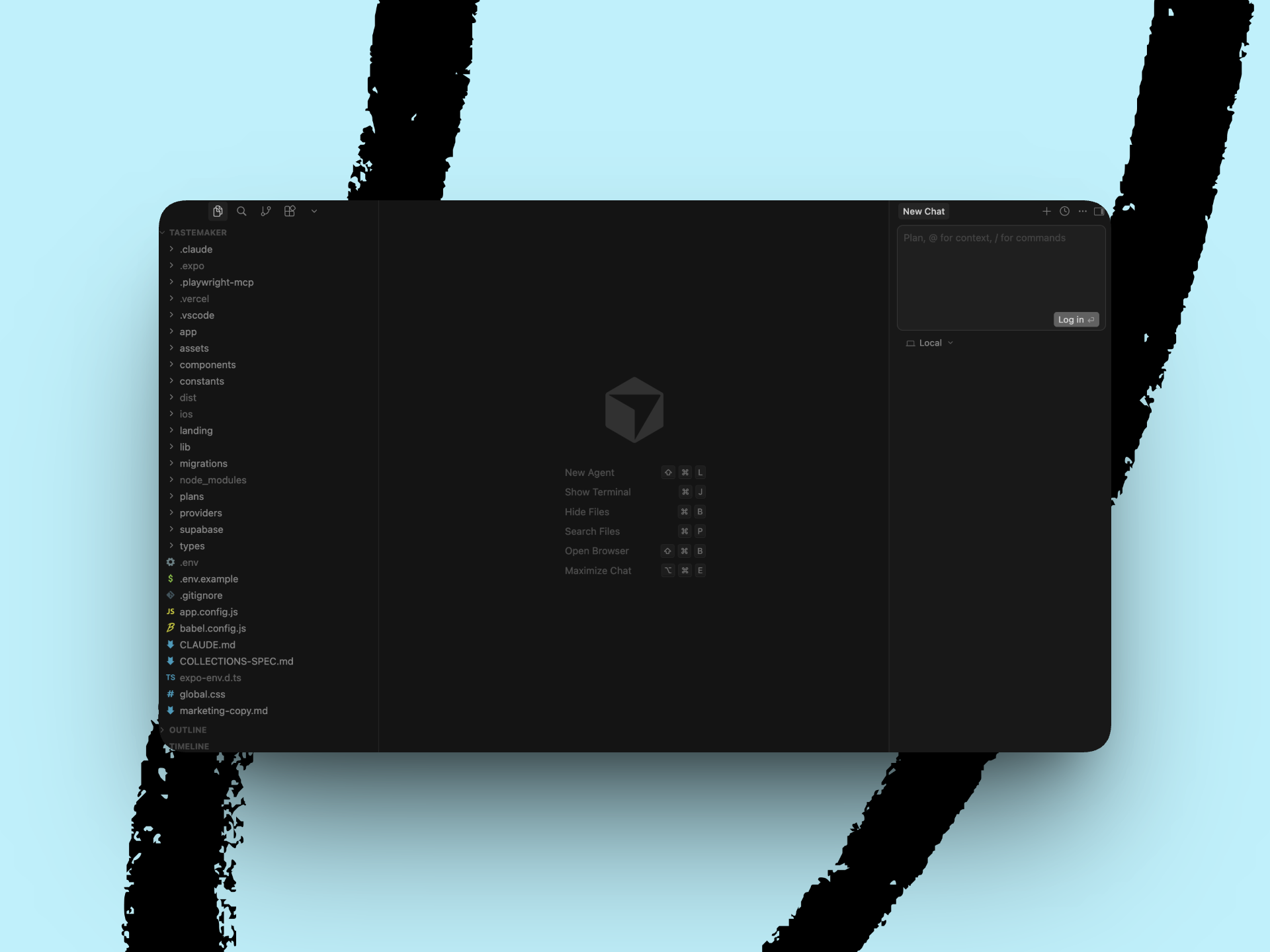
The previous iteration, Cursor 2, featured a three-pane interface with a file tree on the left, an editor in the center, and an AI chat panel on the right. (Image courtesy of Katie Parrott.)
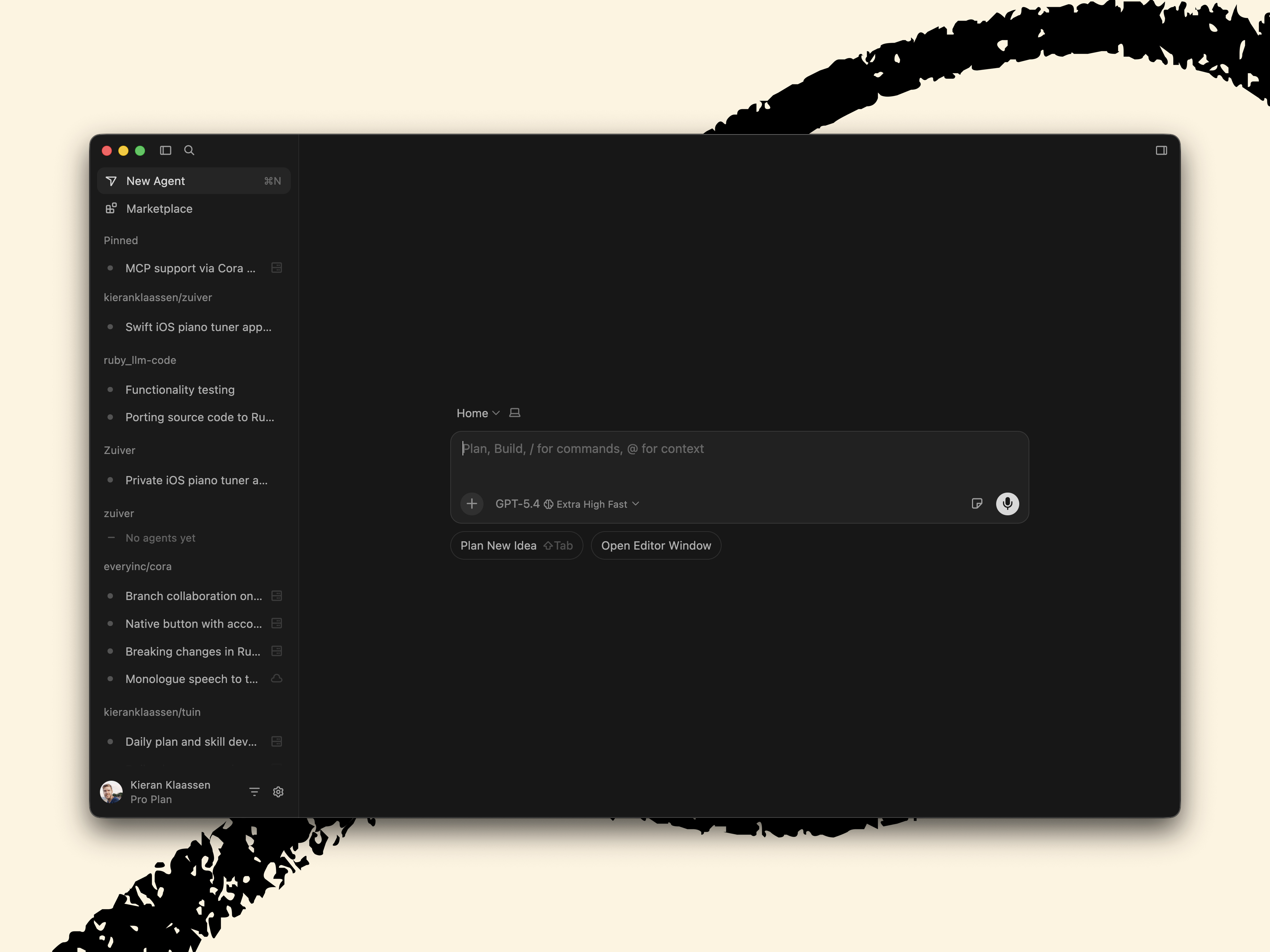
Cursor 3.0’s default view opens on an agent-centered workspace, with repos in the sidebar and a chat-driven orchestration panel replacing the traditional editor-first layout. (Image courtesy of Dan Shipper.)
Cursor charges a base price per seat. But on top of that, some AI usage is metered—the more you use it, and the more expensive the model you pick, the more you may end up paying. Kieran Klaassen said he spent roughly $2,000 in the course of testing (comped by the Cursor team). For heavy users, the cost may end up looking very different from the sticker price.
The Reach Test
“Things I love: Cursor clearly knows how to build a desktop app. Cursor 3.0 is fast and light as compared to resource-intensive monsters like Claude Code Desktop and Codex. It also has a promising cloud orchestration layer: You can spin up an agent from your desktop, walk to get coffee, and watch a video demo from a cloud walking you through the feature it just built. But, ultimately, it’s just not mature enough for me to switch. This is the right strategic direction for Cursor, but it will take a few more releases (and some pain) before this product becomes a viable alternative.”

“Cursor invented the AI-native IDE, and it deserves credit for that. 3.0 feels unfinished—the harness is too aggressive, sessions break, and the interaction model is inconsistent. But they’re moving fast, and if they smooth out the rough edges, this could be a genuine alternative to CLIs for people who aren’t comfortable in a terminal. One thing to flag: I spent roughly $2,000 in two days of normal work—the kind of usage I get for a flat monthly fee with Claude.”

“This moves away from the thing I still valued Cursor for: an IDE where I could micromanage the things AI failed at. The new orchestration layer doesn’t offer anything I can’t already get from my Claude Max plan, and the pricing math makes it worse—$200 per month for unlimited Opus versus paying per-token in Cursor for a similar experience. They are a smart team, and I’m confident this is the direction their customers are pulling them in, but it’s not aimed at me.”

“The app is faster, and the rebuild is noticeable. But I’m not reaching for it—I still open Cursor as an IDE because I’m used to it, not because 3.0 offers something new. Missing basics like a branch selector doesn’t help.”

The headline findings
The identity gap shows up in missing basics
The identity gap—it can’t decide if it’s an IDE or an agent orchestration tool—shows up in small, concrete ways. The filesystem sidebar has been demoted to another tab. You can’t be an IDE without file navigation more easily available—developers need to see and browse their project structure to orient themselves in a codebase.
And you can’t be a serious agent orchestrator if developers still need GitHub Desktop to create a branch, because branching is how you give an agent a safe sandbox to work in without risking your main code.
No filesystem sidebar, no file explorer, no branch selector or creation.
Sessions don’t persist, can’t open agents side by side, no branch sandboxing.
“I can’t get over not having the filesystem on the left. And relegating it to another tab breaks up my workflow.”
—Mike Taylor
The harness fights the model
The harness—the layer of software that connects the AI model to Cursor’s interface and controls how it behaves—is too eager to jump into writing code. Kieran asked Opus 4.6 to investigate a bug, and it immediately started rewriting code instead of looking into the problem first.
In one session, it deleted his entire Codex skill folder. He doesn’t see this behavior in Claude Code with the same model, which means that the issue is Cursor’s harness, not the AI itself. Skills load separately from Claude, Codex, and Cursor with no deduplication.
“It should not disappear like it never existed.”
—Kieran Klaassen, on session persistence
Desktop app performance
The first thing we noticed is that Cursor really knows how to build a desktop application. Andrey Galko’s first reaction was “faster, better app,” and that baseline performance makes a difference when you’re spending all day in a tool.
Composer 2 earns its spot
Composer 2—Cursor’s own LLM—earns its spot as the default model. Multiple testers noted it’s concise, fast, and good at telling you the most salient information succinctly—an improvement over models that bury the answer in three paragraphs of context. The app itself is also faster.
Local-to-cloud orchestration
Local-to-cloud orchestration is the standout feature of this release. The workflow goes like this: You start a task on your machine, decide it’s going to take a while, and push it to a cloud virtual machine with one click. The agent keeps working on its own—writing code, running tests, building the feature—while you close your laptop or move on to something else. When it’s done, it sends you a screencast: a video of itself demoing the feature it just built, navigating the user interface, and clicking through flows.
Agentic orchestration as default
The bigger structural bet—making agentic orchestration the default mode—is one to keep an eye on. If you’ve never used Claude Code from a terminal, set up worktrees manually, or built your own prompt workflows, Cursor 3.0 guides you with its visual interface for all of that. Whether that grammar is clear enough for existing Cursor lovers to adopt this new way of working is another question—one we’ll come back to.
The identity gap shows up in missing basics
The identity gap—it can’t decide if it’s an IDE or an agent orchestration tool—shows up in small, concrete ways. The filesystem sidebar has been demoted to another tab. You can’t be an IDE without file navigation more easily available—developers need to see and browse their project structure to orient themselves in a codebase. And you can’t be a serious agent orchestrator if developers still need GitHub Desktop to create a branch, because branching is how you give an agent a safe sandbox to work in without risking your main code.
Mike’s reaction was visceral: “I can’t get over not having the filesystem on the left. And relegating it to another tab breaks up my workflow. I have spent over eight hours a day for years looking to the left to navigate, so this is not a small change for me.” Kieran couldn’t tell what branch he was on without asking the model, and the UI showed commit buttons on sessions with nothing to commit.
Cursor uses its own .cursor folder rather than interoperating with Claude Code’s skills format, so anyone using both tools is forced to maintain two separate systems. The Claude .skill files don’t render as markdown, which makes browsing and editing them painful.
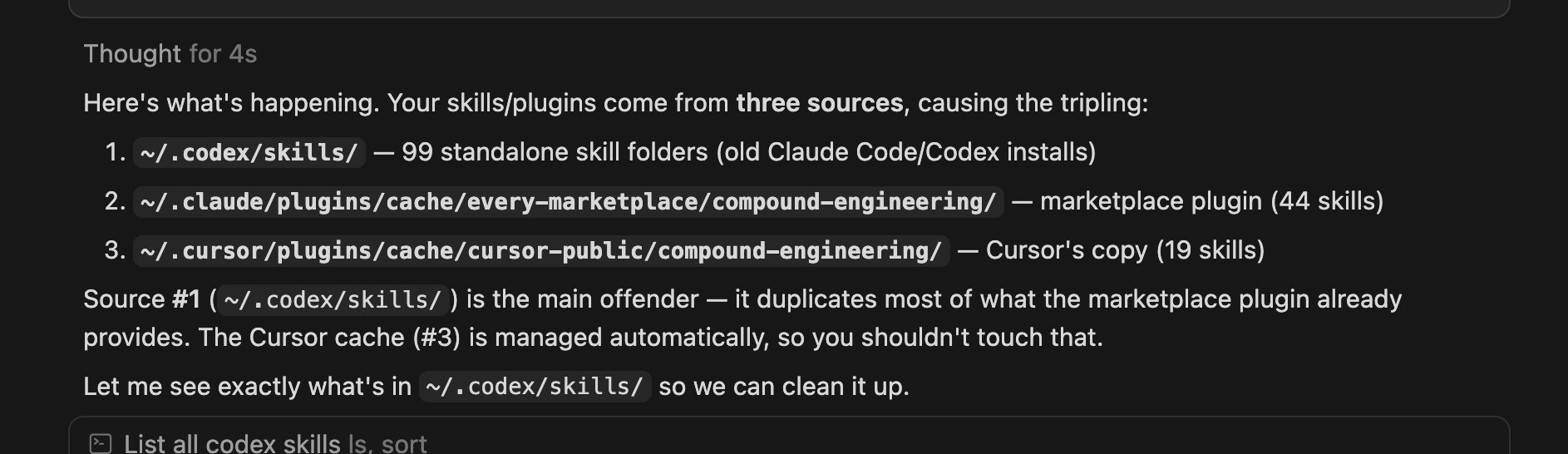
Between Claude Code, Codex, and Cursor, Kieran has to maintain three separate sets of skills. (Image courtesy of Kieran Klaassen.)
The harness fights the model
The harness—the layer of software that connects the AI model to Cursor’s interface and controls how it behaves—is too eager to jump into writing code. Kieran asked Opus 4.6 to investigate a bug, and it immediately started rewriting code instead of looking into the problem first. In one session, it deleted his entire Codex skill folder. He doesn’t see this behavior in Claude Code with the same model, which means that the issue is Cursor’s harness, not the AI itself. Skills load separately from Claude, Codex, and Cursor with no deduplication—and in Kieran’s case, a duplicate marketplace install made it worse.
Session persistence is fragile
Session persistence—the app’s ability to remember what you were doing when you switch between tasks—is fragile. Kieran connected to a remote server, selected a folder, and started working. When he switched to another agent chat inside Cursor to check his daily plan and came back, the connection was gone—as if he’d never set it up. “It should not disappear like it never existed,” he said. If the whole point of the product is coordinating multiple agents at once, you need to be able to move among them without losing your place.
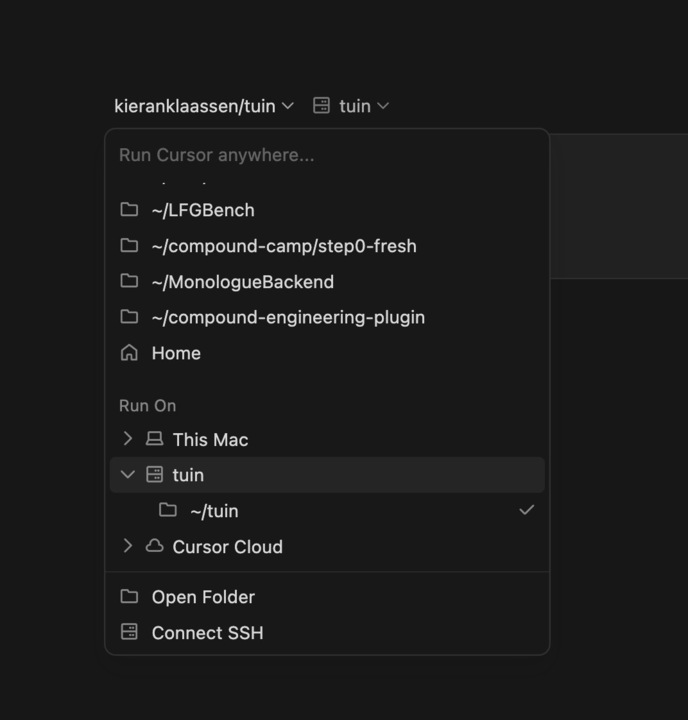
Basic remote navigation feels underexplained: From an active Secure Shell (SSH) session, where you are remotely controlling another computer, it’s not obvious how to switch to another folder without needing to reconnect from scratch. (Image courtesy of Kieran Klaassen.)
Inconsistent interaction model
The interaction model—how you tell the agent what to do—is inconsistent. Sometimes you click buttons, at others you type in the chat window, and the two don’t feel unified. Kieran tried to open multiple agent tabs side by side, something he does routinely with terminal windows, and couldn’t figure out how after five minutes. He couldn’t see what branch of the code he was working on without asking the agent.
Composer 2’s speed cuts both ways
Composer 2’s speed cuts both ways. Kieran agreed it’s snappy but added that it’s “not as deep”—fine for surface-level tasks, but lacking the depth of Opus 4.6 for complex reasoning. And smaller user experience issues add friction—a notification sound on every message, all repos visible in the sidebar even after selecting a project (Mike: “one repo = one context window”—he wants to be able to focus on one project at a time), no GitHub issues tab alongside pull requests.
For IDE users
Missing file navigation and branch management make it hard to use as a primary editor.
For agentic engineers
Underpowered compared to Claude Code and Codex. Session persistence and the harness layer need work.
For newcomers to AI coding
The visual interface is promising, but the interaction model confused even power users.
The bottom line
Cursor 3.0 is a bet that the future of coding is managing agents. The layout, the speed improvements, and Composer 2’s conciseness all point toward a product that’s thinking seriously about what comes after the IDE.
But the growing pains inherent in this transition are showing. Basic features are missing, the skills ecosystem is fragmented, and power users are mostly shrugging. Mike framed it as a question of management style: Are you the person who wants to dig into every line, or the one who sets a vision and lets the system execute? Cursor is picking the delegation side—and that may well be the right call. The problem is that Claude Code and Codex have already established themselves in the delegation market. Building the best IDE with AI built in was a defensible position—Cursor had a genuine edge there.
Kieran initially hoped Cursor 3.0 would open agentic engineering to a wider audience. After a morning of testing, he reversed course:
“Even being an agentic engineer using Cursor feels confusing. I don’t think this will inspire millions of people to start coding like this.”
Kieran KlaassenIf a power user who lives in Claude Code can’t find his footing, the newer audience Cursor is betting on faces an even steeper climb.
Cursor is no longer competing to be the best IDE. It’s competing to be the best way to talk to an AI that writes code for you—and that’s a much more crowded race.