
.png&w=3840&q=75)

Katie Parrott is a staff writer. She writes Working Overtime and contributes to Vibe Checks, Source Code, and Context Window.

How to Use Claude Code for Everyday Tasks—No Programming Required
Why Every's non-technical team members reach for the terminal instead of the chat window
Oct 9, 2025 · 10 min readUpdated Sep 10, 2026

Was this newsletter forwarded to you? Sign up to get it in your inbox.
There's a tool that developers are using to 10x their productivity that most non-technical people don't even know exists—much less that they could be using it too.
It's called Claude Code, and at first glance it looks like something you shouldn't be allowed to touch unless you know how to write code. The black box terminal (the window where developers type their code). The cryptic commands. The unintelligible permissions requests.
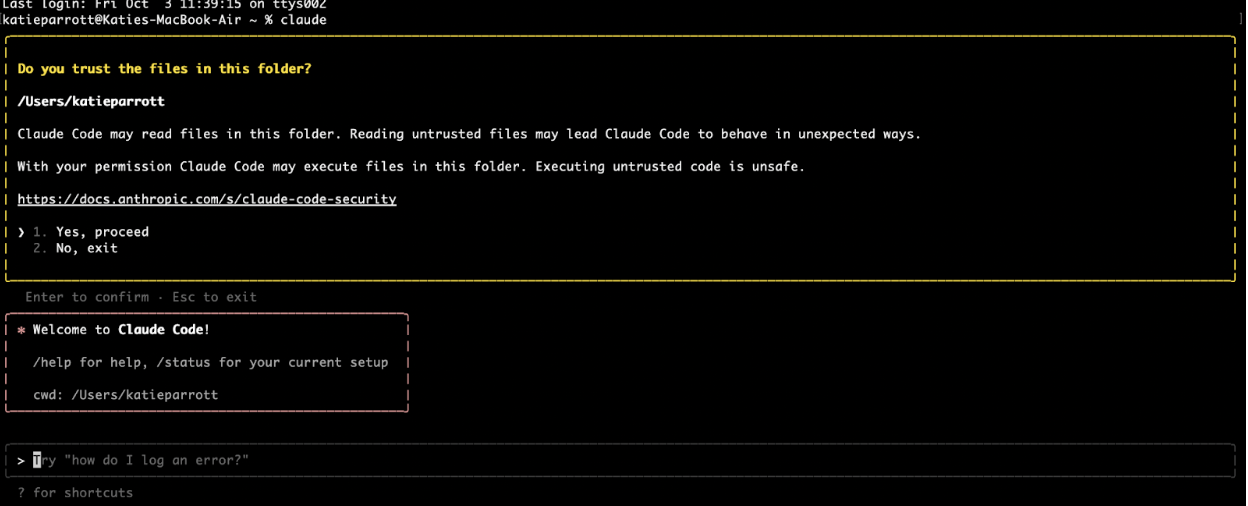
After months of working with Claude Code at Every, we’ve discovered that it isn't just for developers. It's the more powerful version of what you're already using in the Claude app. And if you're hitting limitations there, you can do more with Claude Code.
That was the theme of our latest Claude Code Camp, the live event series where Every's team members share how they use AI tools in production. Nearly 400 subscribers joined to learn how to use Claude Code for non-developer tasks like:
- Building expense trackers that automatically categorize business trip spending across multiple credit cards
- Analyzing massive content datasets to identify which types of stories and introductions drive the highest engagement
- Researching technical codebases to answer customer support questions without having to ask engineers
- Generating marketing content by reviewing recent code changes and drafting copy for a feature release newsletter
Here are the highlights, plus practical demos you can try yourself.
Key takeaways
- Claude Code removes artificial limits. File size restrictions, context window caps, and chat length constraints disappear when AI runs on your computer instead of in the cloud.
- It's AI with training wheels off. Features slowly rolling out in the Claude app already work more powerfully in Claude Code because it's designed for developers who need maximum capability.
- Start simple, then graduate. Don't jump straight to Claude Code for everything. Try the web app first. When you hit limitations, that's your signal to make the leap.
- Installation is easier than you think. Download Claude Code, then open your terminal (it's already on your computer), type “claude,” and you’re ready to go.

Make your team AI‑native
Scattered tools slow teams down. Every Teams gives your whole organization full access to Every and our AI apps—Sparkle to organize files, Spiral to write well, Cora to manage email, and Monologue for smart dictation—plus our daily newsletter, subscriber‑only livestreams, Discord, and course discounts. One subscription to keep your company at the AI frontier. Trusted by 200+ AI-native companies—including The Browser Company, Portola, and Stainless.
What Claude Code is (and why it matters)
Claude Code is Claude running in your terminal—that mysterious box programmers type into. Every computer has one. On Mac, you open Spotlight and type "terminal." On Windows, it's just as easy (ask ChatGPT or Claude how).
The key difference from the chat window you may be used to is that Claude Code runs on your computer, not in Anthropic's servers. This makes it more powerful in three ways:
- Access to all your files, any size. The app requires you to upload files manually, with size limits. Claude Code has access to everything on your computer and can handle massive files without breaking.
- Long-horizon tasks. The cloud app can get confused when chats get too long or tasks too complex. Claude Code can work for hours on elaborate projects because it's running locally and has unlimited memory of what it's doing.
- No artificial limits. Because it's not constrained by cloud infrastructure, Claude Code can browse the internet longer, process more data, and chain together more complex workflows.
Every CEO Dan Shipper used this analogy: "The cloud app is like a hotel room—clean, set up for you, but you start fresh each time. Claude Code is like having your own apartment with AI in it. You can customize it, build on it, and create something together over time."
When you should (and shouldn't) use Claude Code
Dan laid out the decision tree as to when you should use either app...
Become a paid subscriber to Every to unlock this piece and learn:
- When to choose Claude Code over the cloud app
- Four workflows from the Every team that showcase Claude Code's power
- Simple four-step process to start using Claude Code
- Seven common questions answered
Thanks to our Sponsor:

Make your team AI‑native
Scattered tools slow teams down. Every Teams gives your whole organization full access to Every and our AI apps—Sparkle to organize files, Spiral to write well, Cora to manage email, and Monologue for smart dictation—plus our daily newsletter, subscriber‑only livestreams, Discord, and course discounts. One subscription to keep your company at the AI frontier. Trusted by 200+ AI-native companies—including The Browser Company, Portola, and Stainless.
 Create a free account to continue reading
The Only Subscription
You Need to
Stay at the
Edge of AI
The essential toolkit for those shaping the future

"This might be the best value you
can get from an AI subscription."
- Jay S.
 Every Content
 AI&I Podcast
 Monologue
 Every Agent
Join 100,000+ leaders, builders, and innovators

Already have an account? Sign in.
What is included in a subscription?
Daily insights from AI pioneers + early access to powerful AI tools



 Front-row access to the future of AI
 In-depth reviews of new models on release dayPlaybooks and guides for putting AI to workPrompts and use cases for buildersIn-depth reviews of new models on release dayPlaybooks and guides for putting AI to workPrompts and use cases for builders
 Bundle of AI software








 Katie Parrott
 Every Staff
 Kieran Klaassen
Comments