


Yash Poojary is the general manager of Sparkle.

(Re(Re))Introducing Sparkle: Marie Kondo Your Mac
Clear your Mac of the files you don’t need. Keep the rest organized forever.
Apr 14, 2026 · 4 min readUpdated Jun 30, 2026

TL;DR: We’ve rebuilt Sparkle, our Mac file organization app, as an agent-native tool that cleans and organizes your Mac. It’s our biggest update since we first launched it in 2024. The key change is that the new Sparkle cleans your Mac before it organizes it—purging screenshots, installer packages, and other digital junk first, then building a file structure around what’s worth keeping. It’s available now to all paid Every subscribers.
A cluttered file system can feel like a cluttered brain. When your computer is a mess, it takes mental energy to find what you need, much less do actual work.
Clutter is universal—and most of it isn’t worth keeping. Around 80 percent of files on the average Mac are screenshots, installer packages, duplicates, and digital debris you’ll never open again. So before you can get organized, you need to purge. “Organized,” then, depends on the person. Maybe you want to arrange files by topic or date, or by a highly-specific system that only makes sense to you. All count as organized if you can find what you want when you want it.
We’ve rebuilt Sparkle, our file organization app, with this personalization in mind.
The new Sparkle: File organization on your terms
I’ve been the general manager of Sparkle for a little over a year. In that time, I’ve tried a lot of approaches to AI file organization that didn’t quite work. People wanted AI to handle the organizational heavy lifting, and they wanted to be able to change the file structure until it met their exact, often idiosyncratic specifications.
The old Sparkle managed clutter by creating a rigid file system for you. The new Sparkle creates one with you. It analyzes your files and generates a custom system—but only as the starting point. From there, you can make as many changes as you want by chatting with Sparkle’s built-in agent, until the hierarchy feels right.But first: Spring cleaning
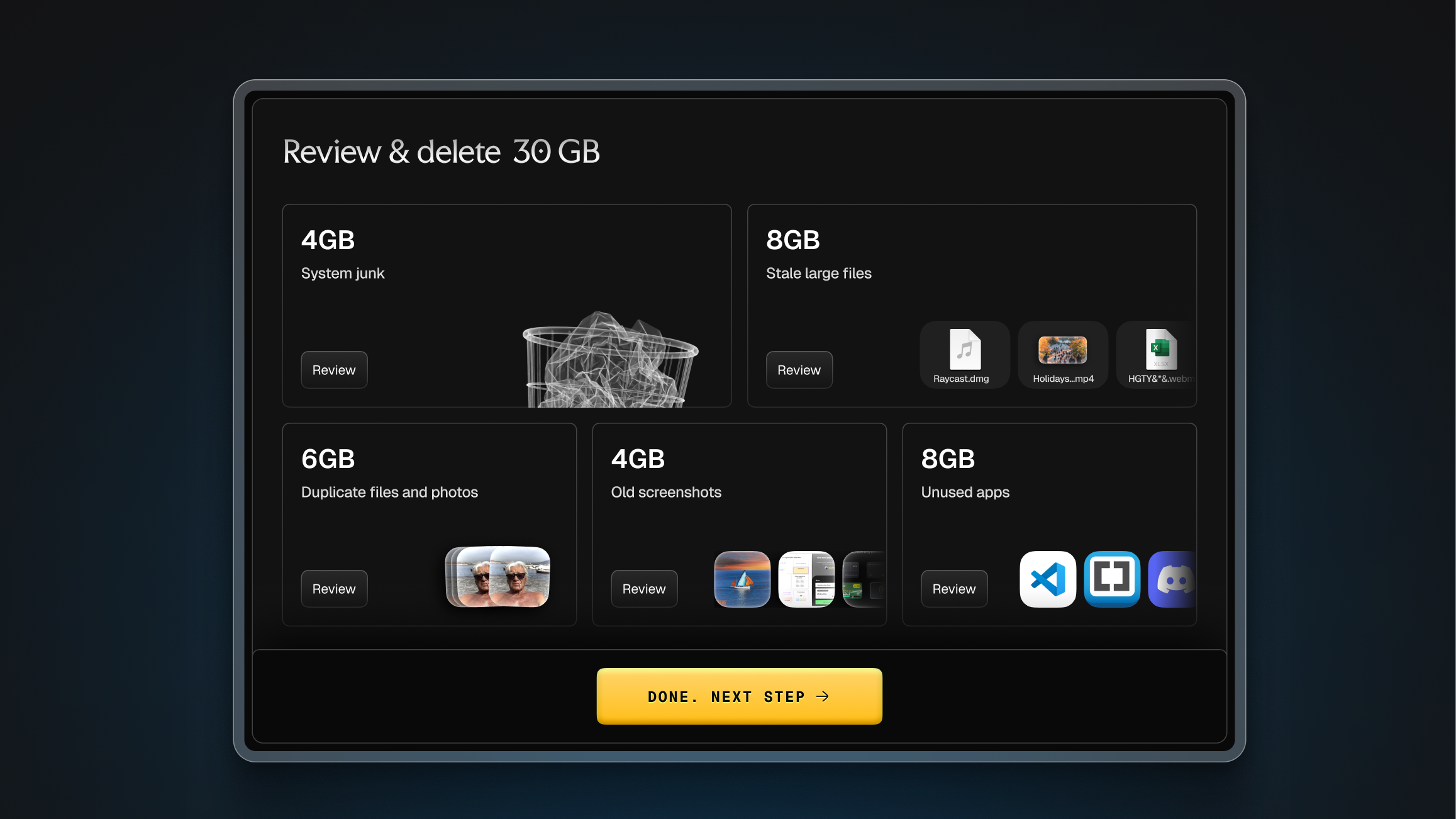
Before organizing what matters, Sparkle helps you get rid of what doesn’t.
The median Sparkle user has around 5,000 files on their Mac. A large portion of those—screenshots, installer DMGs, system cache, duplicates—is digital junk. So we’ve added a clea
n
up pass that runs before organization begins. From the chat window built into the new app, you can ask Sparkle what’s in your trash, or tell it what you want gone (“Clear my screenshots folder” or “remove anything over 1 GB I haven’t touched in a year”). Sparkle wil
l confirm you really want those files gone—and then move them to Trash, which gives you one last opportunity to rescue files before you delete everything.
Getting organized
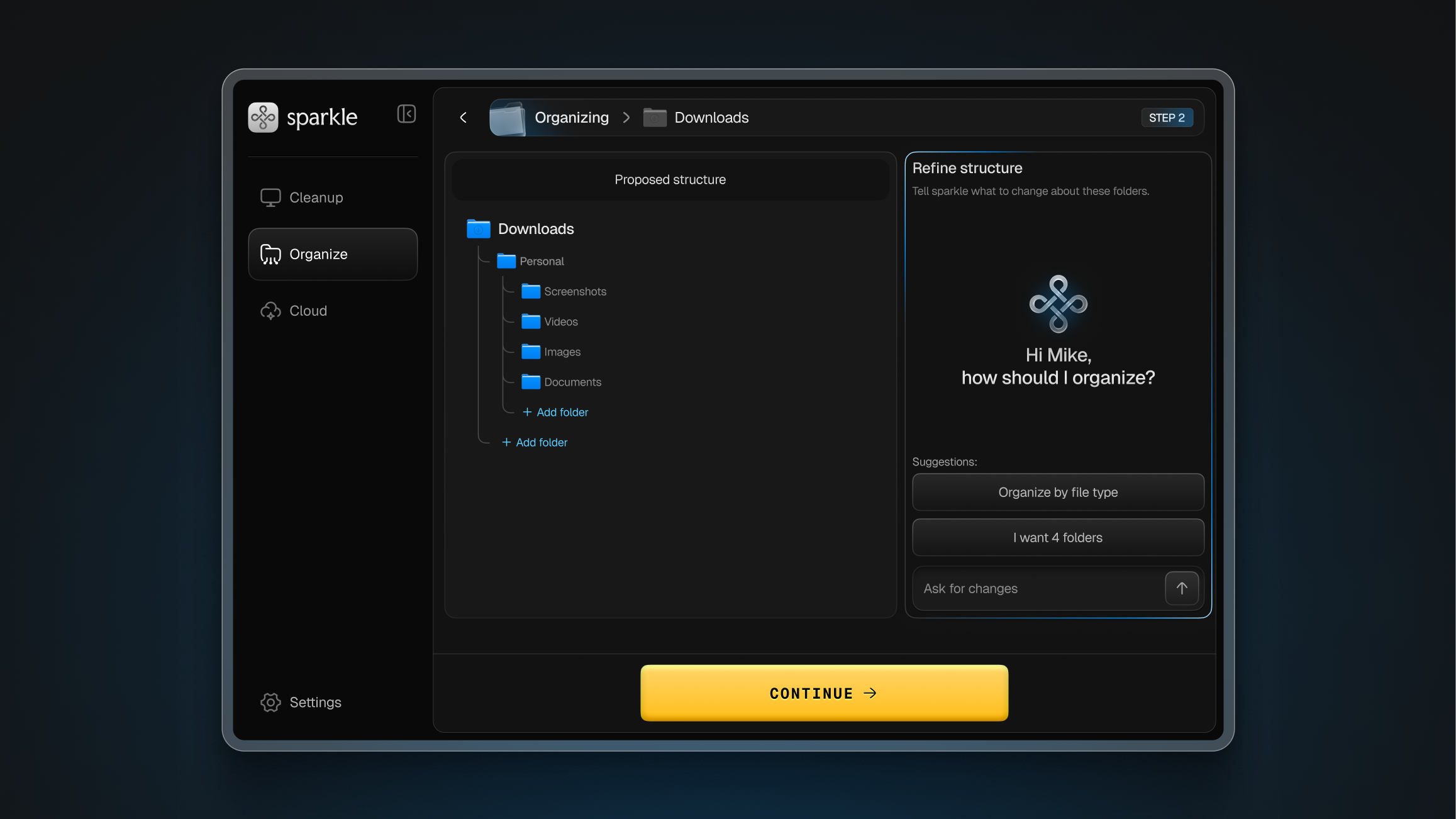
Once cleanup is done, the next stage of work can begin. Sparkle uses a sample of your most recent files to propose a folder structure. You see exactly what it’s suggesting—top-level folders, subfolder labels, and what goes where.
From there, you can rename, merge, delete, reorganize, and add folders, all through chat. If Sparkle creates a “Projects” folder but you’d prefer a “Work” folder—with “Client Projects” and “Internal Projects” nested inside—you can tell the agent and it will make the update.
Under the hood
Sparkle’s agent-native architecture became practical about four months ago, when the Claude Code SDK became available. Before that, you could approximate the ability to have an agent move and delete files through a chat window, but building it safely was much harder.
We’ve also found a way to create sophisticated file systems while balancing speed and cost. Sparkle starts by analyzing a sub-section of your recent files with Opus 4.6, a very smart (and expensive) model. After you sign off on the folder structure, classifying new files into the folders you’ve defined doesn’t require heavy AI lifting: A file called “Q1 invoice.p
df” goes into “Finance,” a contract goes into “Legal,” an audio file goes into “Transcripts.” Haiku 4.5, a faster, cheaper model, can handle this just fine.
This way, you get a smarter model where it counts, without having to pay for unnecessary usage.
Try it for yourself
AI produces better outputs when paired with human judgment. That’s as true for file organization as it is for writing and code.
The new-and-improved Sparkle is available to all paid Every subscribers.
Thanks to Laura Entis for editorial support.
Yash Poojary is the general manager of Sparkle.
To read more essays like this, subscribe to Every, and follow us on X at @every and on LinkedIn.
For sponsorship opportunities, reach out to [email protected].
The Only Subscription
You Need to
Stay at the
Edge of AI
The essential toolkit for those shaping the future

"This might be the best value you
can get from an AI subscription."
- Jay S.
 Every Content
 AI&I Podcast
 Monologue
 Every Agent
Join 100,000+ leaders, builders, and innovators

Already have an account? Sign in.
What is included in a subscription?
Daily insights from AI pioneers + early access to powerful AI tools



 Front-row access to the future of AI
 In-depth reviews of new models on release dayPlaybooks and guides for putting AI to workPrompts and use cases for buildersIn-depth reviews of new models on release dayPlaybooks and guides for putting AI to workPrompts and use cases for builders
 Bundle of AI software








 Katie Parrott
 Every Staff
 Kieran Klaassen
Comments