




This event was produced in partnership with Notion. They had no input on the development of this article.
Want to learn alongside Every’s team? Check out our upcoming camps and courses at every.to/events.
Every runs six products, a media company, and a consultancy with around 25 people. At any given moment, each person has roughly 30 tasks on their to-do list. So how do they figure out which to work on first?
The team used to rely on Brandon Gell, Every’s COO, to run traffic control and coordinate the whole company, which required him to manually cross-reference launch calendars, company strategy documents, and task lists. Now he messages a Notion agent named Anton in Slack and gets a prioritized list for himself and others in seconds.
Anton is one of four custom agents Every has built with help from Notion AI over the past few months. Each one automates a different task that, without the agent, would require tedious logistical work to track and schedule. Each one draws on the same set of interconnected databases that the team already maintains.
At our first Custom Agents Camp, produced in partnership with Notion, Brandon and Every head of growth Austin Tedesco, walked more than 500 subscribers through four agents they’ve built, the databases underneath them, and how to create your own. Notion product designer Brian Levin also joined to share best practices from the Notion team.
Key takeaways
- Describe the outcome, not the steps. Tell the AI what you want to accomplish and let it figure out the implementation. Over-prescribing (“Create a database, then add a relation, then filter by...”) tends to confuse the model.
- Your Notion is your agent’s brain. Custom agents get powerful when they can query interconnected databases. Every’s agents work because strategy, calendar, tasks, people, and meeting notes all live in Notion and reference each other.
- Don’t write the agent’s instructions yourself. Tell Notion AI what you want the agent to accomplish, and it will generate the instructions. Or use Claude Code with Notion’s API to build the whole thing from your terminal.
Anton: The prioritization agent
Every ships something almost every day, whether it’s a product update, an article, an event, a consulting deliverable, or a combination. Each launch gets its own set of tasks inside Notion, automatically populated from a template when the launch is added to the calendar.
The system works beautifully for tracking the full universe of tasks that exists. The problem is prioritization. With multiple launches overlapping each week, figuring out which of your 30 tasks matters this morning requires mentally weighing launch dates against company strategy against what your teammates are blocked on. Brandon used to be the human router for all of that. Now Anton does it.
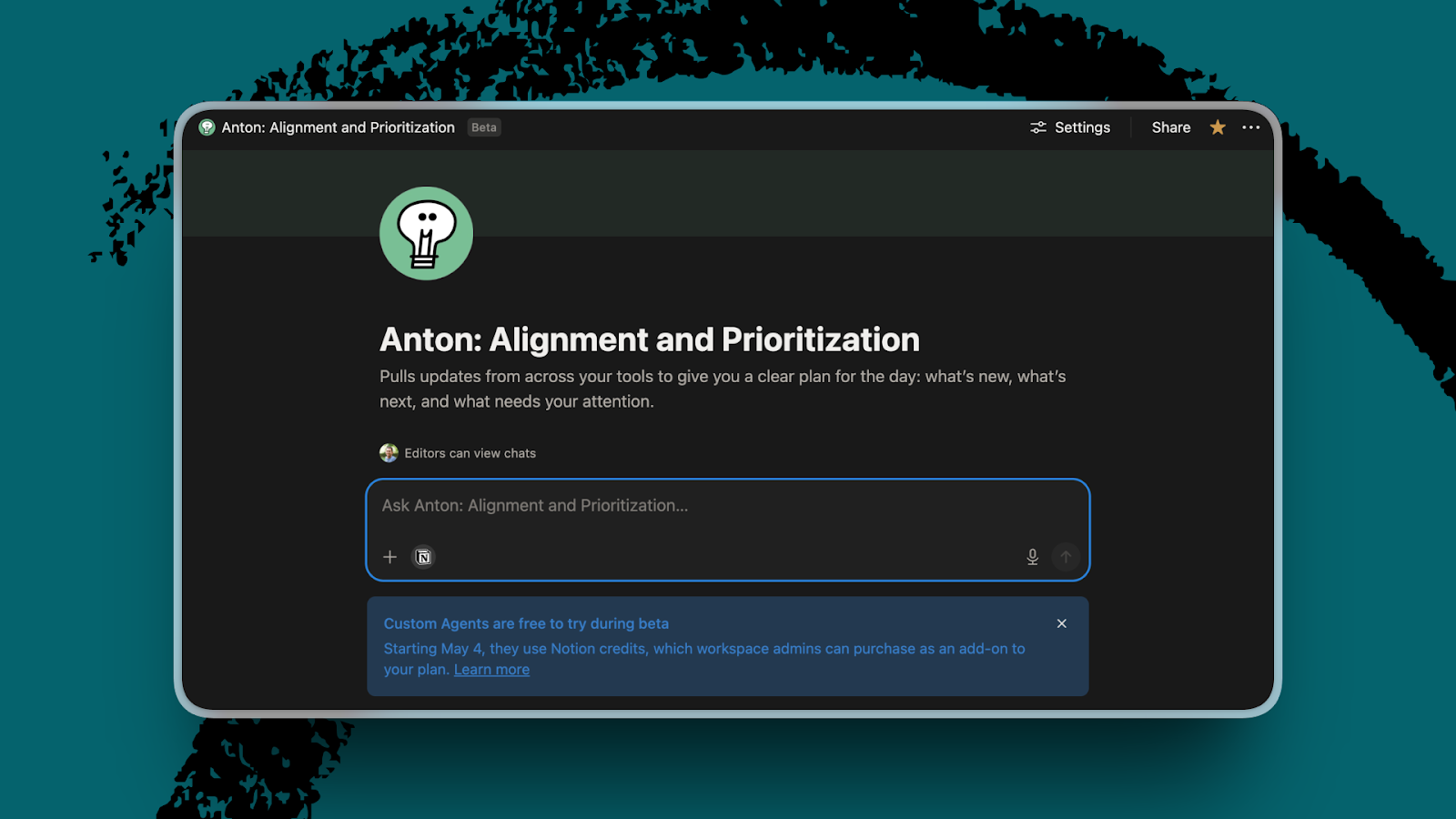
Anton also runs a daily broadcast to the whole company in Slack, summarizing what’s happening that week, and people can thread on the message to ask follow-up questions. “Having agents directly in Slack is where most of these conversations happen,” Brandon said.
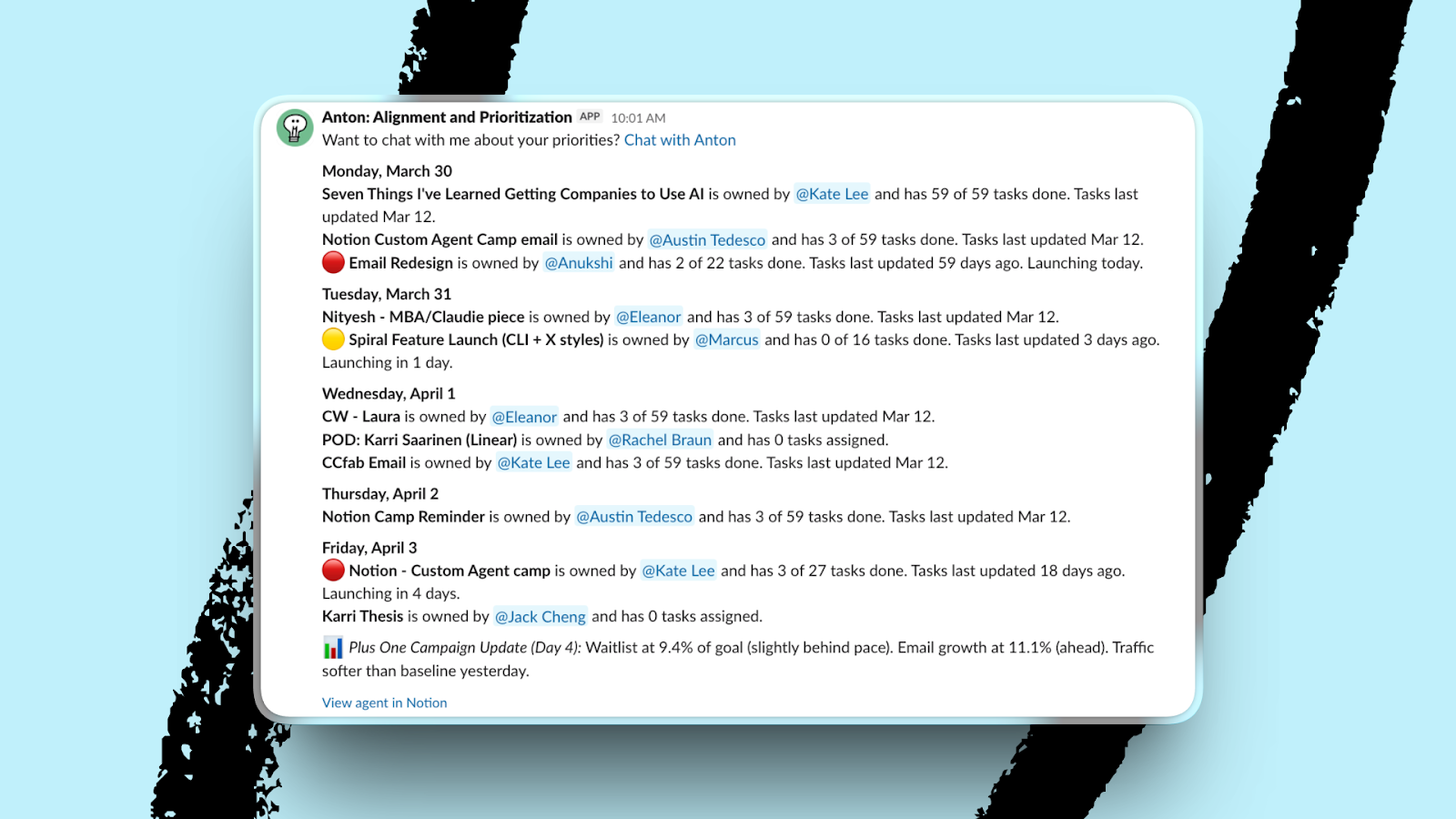
The details:
- Goal: Answer “What should I work on today?” for any team member, and post a daily company-wide priority summary to Slack.
- Access: Company strategy document, OKRs database, unified calendar, tasks database that is linked to calendar entries, and a people database mapping each person to their team and role.
- Outcome: A prioritized task list personalized to whoever’s asking. The agent can also answer team-level questions (“What are Cora‘s priorities this week?”) because it knows the organizational structure.
Here’s a prompt so you can build it yourself in Notion:
 Create a free account to continue reading
The Only Subscription
You Need to
Stay at the
Edge of AI
The essential toolkit for those shaping the future

"This might be the best value you
can get from an AI subscription."
- Jay S.
 Every Content
 AI&I Podcast
 Monologue
 Cora
Cora
 Sparkle
 Spiral
Join 100,000+ leaders, builders, and innovators

Email address

Already have an account? Sign in
What is included in a subscription?
Daily insights from AI pioneers + early access to powerful AI tools


 Front-row access to the future of AI
 In-depth reviews of new models on release day
Playbooks and guides for putting AI to work
Prompts and use cases for builders
In-depth reviews of new models on release day
Playbooks and guides for putting AI to work
Prompts and use cases for builders
In-depth reviews of new models on release day
Playbooks and guides for putting AI to work
Prompts and use cases for builders
In-depth reviews of new models on release day
Playbooks and guides for putting AI to work
Prompts and use cases for builders
 Bundle of AI software





 Yash Poojary
.12.16_PM.png)
 Rhea Purohit
.png)
 Katie Parrott
 Reviews of new AI models on release day
Comments
Don't have an account? Sign up!
Y'all make it look and sound so easy! ;-)