



The Dawn of Codex-native Apps
Plus: Delegation versus collaboration, Dan’s inbox-zero Codex workflow, and the agentic version of Musk’s five rules of automation
May 5, 2026


Inside Every
Working with AI right now often means making the same judgment call dozens of times a day: Hand this task off to an agent or stay close to the process? “The landscape of working with AI is bifurcating,” is how CEO Dan Shipper put it in Every’s Monday standup. On one side is the agent you delegate to. On the other is the agent that sits beside you while you write, code, triage, revise, and decide.
Watching the Every team work, you can’t unsee it. Dan delegates bug reports for our collaborative document editor, Proof, to his OpenClaw agent, R2-C2. But he stays close to his inbox through a combination of Codex, Every’s AI email assistant Cora, and a document with custom rules (steal his workflow below). Kieran Klaassen hands the middle of his compound engineering workflow to the model but works closely with it to brainstorm at the beginning and polish at the end. I (Katie Parrott) send the model off to do research, but I’d never trust it to execute a full draft without my hands firmly on the wheel.
Which means the allocation economy thesis was only right about half the work. Some of it still wants delegation, but the other half wants you to stay close, pairing on every move with the model in the same window. The two halves demand different skills, and the meta-skill is knowing which is which.
Think of it as the AI version of the serenity prayer: Grant me the serenity to delegate the work I can, the expertise to sit with the model on the work I can’t, and the wisdom to know the difference.
Was this newsletter forwarded to you? Sign up to get it in your inbox.
Steal this workflow
Get to inbox zero with Codex
The perfect email workflow is the white whale productivity people have chased for a decade, Dan included. His latest AI-native version puts the agent in the inbox and the human in a shared document, where every draft and decision stays visible. Here’s how he does it:
1. Write a one-page operating manual for your inbox. The document, which Dan keeps in Proof, names his VIPs, describes what to auto-archive, summarize, or draft, and explains how to handle scheduling.
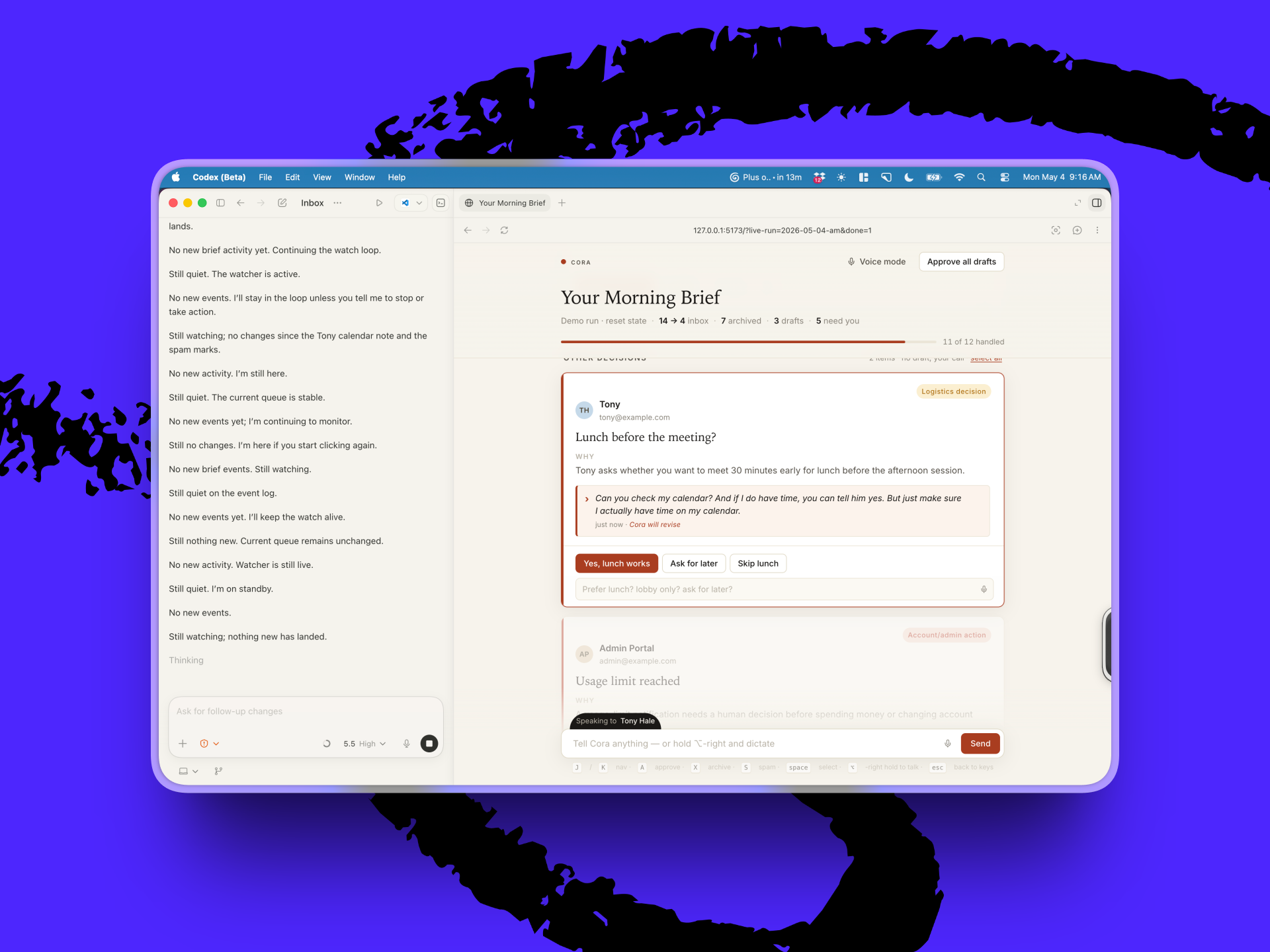
2. Open your agent-native email tool in Codex. In Codex’s browser pane, Dan loads Cora, which gives the agent two ways to act: command line instructions to archive threads—but also the ability to click through the inbox like a person.
3. Work from a document instead of your email. Dan has Codex create a separate Proof document for each inbox run. Codex sweeps the inbox, archives what the operating manual says to archive, and adds every draft or decision to the bottom of the document. Dan replies inline: “Spam,” “archive,” “reply just to Willie asking what he wants to do here,” “send the invite, draft a reply to Tony.” Codex picks up each instruction, drafts in Cora simultaneously as Dan moves onto the next message, and waits for approval before sending.
Try it this week: Write a one-page “how to do my email” document with your own VIPs, auto-archive rules, scheduling preferences, and reply style. Then open Codex, load your email client in its browser pane, and paste in your instruction document and this prompt:
“Sweep my inbox using this operating manual. Put every draft and decision in this doc and wait for me before sending anything.”
 Create a free account to continue reading
The Only Subscription
You Need to
Stay at the
Edge of AI
The essential toolkit for those shaping the future

"This might be the best value you
can get from an AI subscription."
- Jay S.
 Every Content
 AI&I Podcast
 Monologue
 Cora
Cora
 Sparkle
 Spiral
Join 100,000+ leaders, builders, and innovators

Email address

Already have an account? Sign in
What is included in a subscription?
Daily insights from AI pioneers + early access to powerful AI tools





 Front-row access to the future of AI
 In-depth reviews of new models on release day
Playbooks and guides for putting AI to work
Prompts and use cases for builders
In-depth reviews of new models on release day
Playbooks and guides for putting AI to work
Prompts and use cases for builders
In-depth reviews of new models on release day
Playbooks and guides for putting AI to work
Prompts and use cases for builders
In-depth reviews of new models on release day
Playbooks and guides for putting AI to work
Prompts and use cases for builders
 Bundle of AI software




.png)
 Every Staff

.05.38_PM.png)
 Alex Duffy
 Reviews of new AI models on release day
Comments
Don't have an account? Sign up!