





Quarterly and annual planning is a painful process that many of you have likely experienced. Every’s head of growth Austin Tedesco describes how the intentional use of AI can cut the process from weeks to hours, leaving you and your team with more energy and focus. If you’re already seeing your annual planning spilling over into January, this one’s for you.—Kate Lee
Was this newsletter forwarded to you? Sign up to get it in your inbox.
The quarter is closing. You’ve spent hours compiling data about your team’s performance. Your calendar is filling up with planning meetings, but your team is messaging you for help on the final push to meet this year’s targets. You feel pulled in a million directions.
I’ve seen organizations struggle with this tension throughout my career in media and startups. Focus too much on the day-to-day of the business at yearly and quarterly junctures, and you lose the chance to extract lessons from previous work. Focus too much on strategy, and growth stalls.
This doesn’t mean that you need to bypass formal cycle planning, as many startups do. Taking time to align on goals and build a focused roadmap is necessary to drive growth. The problem is how long the process takes—finding yourself in mid-January without your annual goals finalized.
Innovative companies are now solving this conundrum with AI, and it’s something we are also rolling out at Every. Bringing AI into the process saves time, leads to more refined goals, and preserves energy for the work that matters.
The tech stack
It’s helpful to start with a standard framework for the planning itself. In the past, I’ve used the W Framework. Outlined by Lenny Rachitsky and Nels Gilbreth, previously at Airbnb and Eventbrite, respectively, this approach to quarterly and yearly planning involves four steps:
- Context: Leadership shares a high-level strategy with teams.
- Plans: Teams respond with proposed plans.
- Integration: Leadership integrates into a single plan and shares it with teams.
- Buy-in: Teams make final tweaks, confirm buy-in, and get rolling.
When done well, these documents are immensely valuable. They outline what each department will and won’t do, who owns those projects, and a standard for success in a concise and data-driven way. Call it what you will—OKR, KPI, or DRI—but the most important thing is driving focus and alignment on the few things that matter most.
I’ve worked at companies where each of these steps takes multiple days—sometimes entire weeks. Here are three tools I’ve used to shrink that down to just a couple of hours.
Shared knowledge hubs
A central LLM-supported source for all relevant information: what happened last quarter or year, what you’re planning in the next period, concrete examples, data, templates for briefs. A COO or chief of staff can compile this in projects via Claude, ChatGPT, or Notion.
You can include:
- Previous plans and reflections on previous work
- Templates and examples for written documents and presentations
- Guidance on tone and audience (such as a style guide)
- Company strategy docs and OKRs
- Relevant data (actual performance, targets, year-over-year comparisons)
- Meeting notes from planning conversations
When you have this set up across your entire team, you never have to start from a blank page. You don’t have to go hunting for examples for a client presentation or run data analysis from scratch. You ask, and it answers. At some forward-thinking companies, I’ve seen these knowledge hubs automatically pull in new meeting notes, Slack conversations, and up-to-the-minute data.
If you are using a knowledge hub like Claude Projects that can include instructions for how the model should behave, telling the model to ask clarifying questions before doing any work. It’ll probe for gaps you didn’t know you had.
AI notetaker
Granola, Notion, Google, Zoom—there are a lot of good options for recording meetings before and during the planning process. These notes are helpful for the initial draft of the planning documents, but they’re most powerful when you are making revisions to the documents and integrating goals with other teams.
Speech-to-text tool
This has been the biggest game-changer for me. At Every, we use our in-house AI dictation tool Monologue. I start any brief by doing a brain dump—saying out loud what I think we should do, how the document should look, and my read on the data. I spill without being precious about tone, word choice, or finding the perfect examples.
Strategic writing, especially for cycle planning, is hard. But speaking loosely into a context window that already understands your goals, document templates, style guides, and past planning rounds makes it a lot easier because you aren’t held back by document formatting or too much detail.
Step-by-step implementation
Once you have your tools and the internal information that will inform planning, here’s how the process comes together.
Step 1: Get aligned on company strategy
Talk to leadership about the larger company strategy and how your department’s plans should support the company’s highest-level goal. This usually takes me about 90 minutes in meetings with company leads and key stakeholders, plus some asynchronous discussions.
Add notes from those conversations and relevant documents to your knowledge hub. If you’ve enabled an auto-sync between the platform that your team uses to communicate (like Slack or Discord) or AI meeting notes software to your knowledge hub, that’s great. If not, a simple copy-paste job works quickly.
Step 2: Brain dump with speech-to-text
Now you’re ready to roll. Pull up your speech-to-text tool and the template for your planning brief. Then talk over the template for five to 10 minutes, giving your thoughts on what should go in each section. Don’t overly edit yourself—just talk. Call out any gaps you can’t remember, such as, “I know this kind of post worked well for us on YouTube last quarter. Can you find the numbers?” Treat the agent like your writing partner.
Step 3: Let the model interview you
After your brain dump, you might be tempted to ask the agent to start drafting. That’s what I did earlier this year with Claude 3.7 Sonnet in a project, and I’d grade the output a D-. I didn’t provide context in the project instructions and dumped too much information into the knowledge hub without clarifying what it was. As a result, the strategy was overindexed on out-of-context data points or ideas from meeting notes that were said emphatically but not aligned with the company goal. It built a whole quarterly plan around a single Instagram post that dramatically overperformed due to a variety of confounding variables.
That’s normal, and there are two fixes:
- Audit the knowledge hub and instructions. Is the agent making assumptions it shouldn’t? Provide clarity in the project instructions on the things that matter. This was the mistake I made with my attempt at planning earlier this year in Claude.
- Tell the agent to interview you before drafting. This is a step that has helped me immensely. Each knowledge hub I build includes the line, “Always ask me probing, clarifying questions before doing large tasks. Include sources for any data referenced.”
The model will ask things like: “You mentioned resource constraints—can you be more specific?” or “You mentioned to check the relevant docs for more data. Should I search the knowledge hub for specifics now, or do you want to specify which ones after you see the structure?” Sometimes this can be 10 questions over the course of the whole chat, with one or two questions at a time.
After these questions, ask the model to produce a draft. My goal at this stage is to get a first draft of B- quality.
Step 5: Voice-over revisions
Start Monologue again. Read through the draft and talk through your notes directly back into the same chat with the same agent. Some might be big (“this section is a misunderstanding, here’s what I actually meant”). Some are minor tweaks. Then, ask the AI to create an updated draft. After this round, the goal is to get to an A-. Give the brief one final pass, making manual adjustments. The plan should be finalized in under an hour.
Step 6: Integrate across teams
Now you have strategy briefs with each department’s goals, projects, and owners. This is where AI becomes truly useful, because it’s easy to compare plans across teams and identify weaknesses:
- Spotting resource conflicts—are we asking too much of engineering?
- Finding dependency overlaps—do three teams all need the same data pipeline by March?
- Highlighting gaps in coverage—who owns this outcome?
Here are a few prompts that work to make sure that plans are aligned across teams:
- “Compare these five team plans and show me where priorities conflict.”
- “Where are resources most requested? Which team has the most dependencies?”
- “If we hit our goals, what will be the primary reason why? And if we don’t, why not?
Once the edits are in at this stage from your leadership team, go back to the agent and tell it which changes to implement, which to ignore, and which to interview you further about.
Step 7: Generate your deliverables
Often, you need multiple versions of the same plan: the five-minute executive summary, the 20-minute all-hands version, the detailed team breakdown. Claude is adept at this kind of multi-version task, but prototyping tool Figma Make is my go-to for anything needing design elements, especially since I can copy-paste in references from approved team designs. I’ll ask whatever LLM tool I am working with to give me the exact prompts Figma Make needs to create a three-slide all-hands presentation, and the first version will typically only require a small revision.
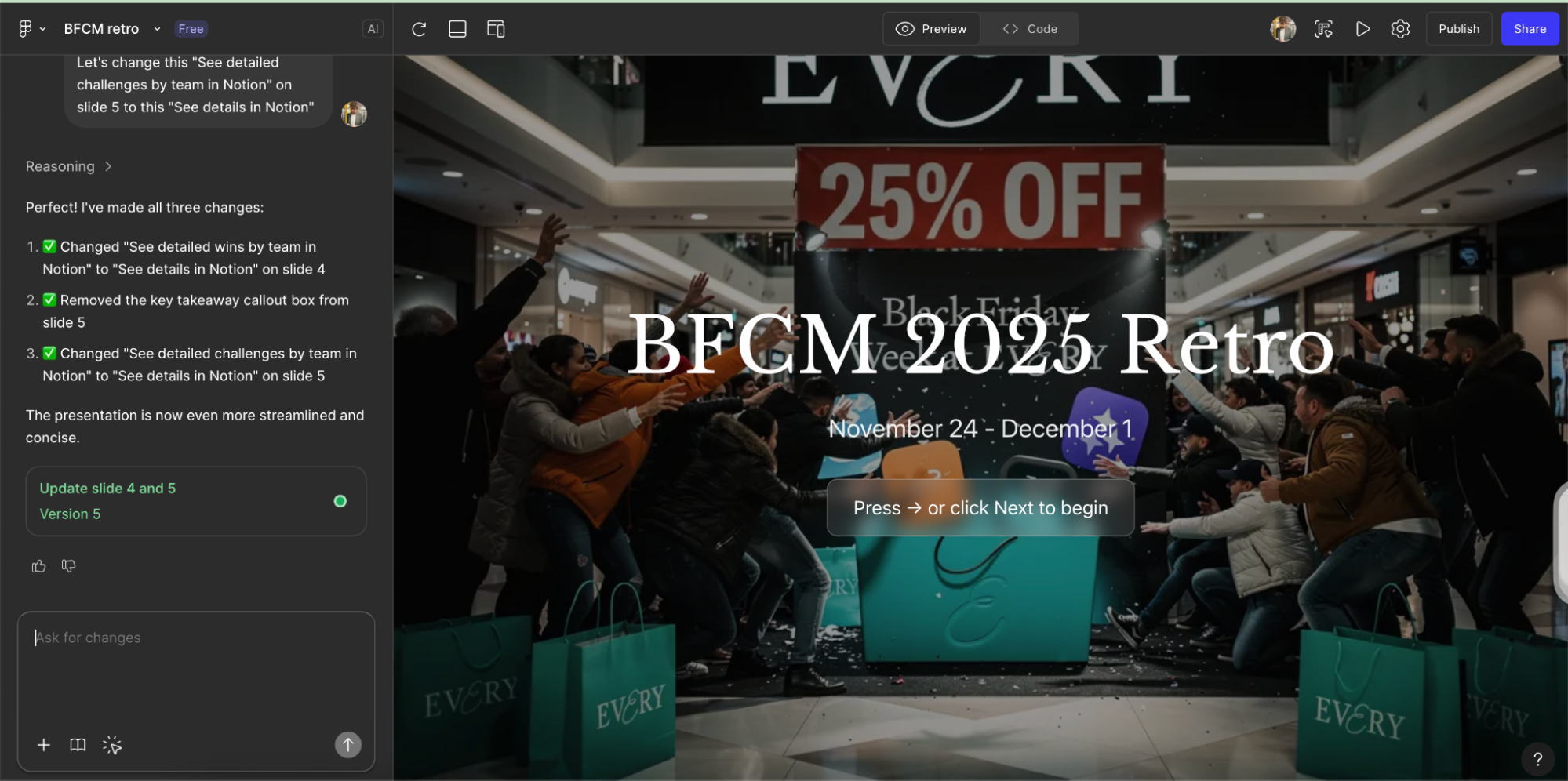
Four compounding benefits of better planning
The benefits of working this way go beyond just speed:
You start executing early. When planning takes days instead of weeks, you gain two to four weeks of work time. Your team isn’t still aligning while competitors are launching products.
You get a thought partner. The interview step—where the model probes before drafting—makes your thinking sharper. For instance, it will steelman why you’re not investing more heavily in paid ads and pivoting to better top-of-funnel drivers.
You preserve your energy. Planning is depleting. You rarely feel energized to execute after weeks of alignment meetings and document revisions. This approach gives your team momentum to focus on and achieve their goals.
You build AI buy-in: The biggest blocker to AI-powered efficiency at most companies is adoption. Knowledge workers in particular need that a-ha moment to get hooked. Taking a task widely accepted to be painful and bringing radical levels of speed and ease to the process is a major inflection point that pays off in the long term. The next time your team hits a roadblock, they’re more likely to explore an efficient, cutting-edge, AI-powered solution.
Austin Tedesco is the head growth at Every. Previously, he ran business development at Substack and NBA subscription strategy at ESPN. You can follow him on LinkedIn.
To read more essays like this, subscribe to Every, and follow us on X at @every and on LinkedIn.
We build AI tools for readers like you. Write brilliantly with Spiral. Organize files automatically with Sparkle. Deliver yourself from email with Cora. Dictate effortlessly with Monologue.
We also do AI training, adoption, and innovation for companies. Work with us to bring AI into your organization.
Get paid for sharing Every with your friends. Join our referral program.
For sponsorship opportunities, reach out to [email protected].
The Only Subscription
You Need to
Stay at the
Edge of AI
The essential toolkit for those shaping the future

"This might be the best value you
can get from an AI subscription."
- Jay S.
 Every Content
 AI&I Podcast
 Monologue
 Cora
Cora
 Sparkle
 Spiral
Join 100,000+ leaders, builders, and innovators

Email address

Already have an account? Sign in
What is included in a subscription?
Daily insights from AI pioneers + early access to powerful AI tools

 Front-row access to the future of AI
 In-depth reviews of new models on release day
Playbooks and guides for putting AI to work
Prompts and use cases for builders
In-depth reviews of new models on release day
Playbooks and guides for putting AI to work
Prompts and use cases for builders
In-depth reviews of new models on release day
Playbooks and guides for putting AI to work
Prompts and use cases for builders
In-depth reviews of new models on release day
Playbooks and guides for putting AI to work
Prompts and use cases for builders
 Bundle of AI software




 Reviews of new AI models on release day
Comments
Don't have an account? Sign up!
I've suffered through more than enough aimless, generalized Exec Planning Retreats and BoD Planning Marathons, replete with an outside hired-gun "business consultant" to "facilitate discussions and outcomes" (an early form of "AI"?) -- more than enough to last me a lifetime. This article outlines an intelligent alternative approach -- Ill look forward to an opportunity to work with it and see the improved results. Thanks!