



The Agent That Saved My Brain
How Every's growth lead built a command center in Claude Code
March 23, 2026 · Updated April 18, 2026


If your job involves toggling between a dozen apps and sources of data, this one’s for you. Every’s head of growth Austin Tedesco—who will be the first to tell you he doesn’t have a technical background—used Claude Code to build an agent that handles the manual parts of his role. Here’s how he did it, what he learned, and how you can build your own. He’s also open-sourced the compound knowledge plugin that powers part of the system, inspired by Kieran Klaassen’s compound engineering system.—Eleanor Warnock
Join us this Friday for Every’s Q2 Demo Day, where we’ll go deeper on how agents are changing the way we work via a brand new product we’re launching in beta.
I was in a meeting recently when someone asked how the buttons on a new landing page were performing. Months earlier, that question would have sent me on a distracting dashboard scavenger hunt. Instead, I typed “Can you get the click-through and conversion numbers on these buttons?” into an agent in Slack and had the answer in a couple of minutes, complete with relevant context.
For years, a large part of growth jobs like mine involved searching for information across multiple surfaces, analyzing it, distilling it into a plan somewhere else, and then executing on it. Sifting through Slack for team updates. Pulling data sets from Stripe, PostHog, and ChartMogul. Importing planning documents into projects on Claude’s desktop app for manual analysis and then exporting them back to Notion to share with the team.
If you, like me, can’t have too many browser tabs open without losing your mind, that kind of regular context and tool switching chips away at productivity and creativity in meaningful ways. By the time you gather everything you need to think, you’re fried. You have nothing left for the decisions that matter.
I built an agent that fixed this for me. Its name is Montaigne. Most of what you hear about AI agents is that they get things done fast. And Montaigne is fast. But the reason why I can’t imagine working without it is that it allows me to have energy for the hard and fulfilling parts of my job. Montaigne keeps me sane.
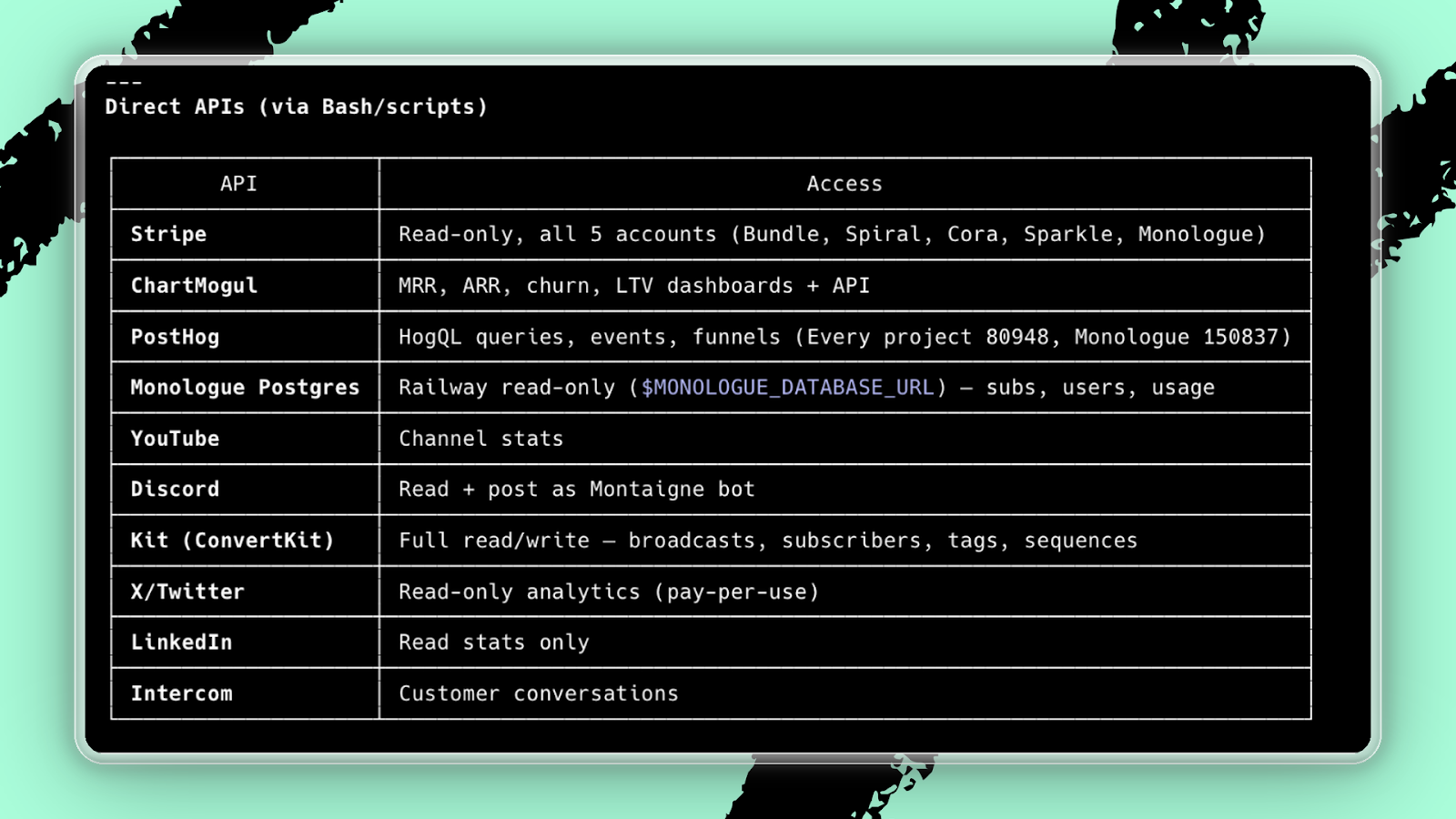
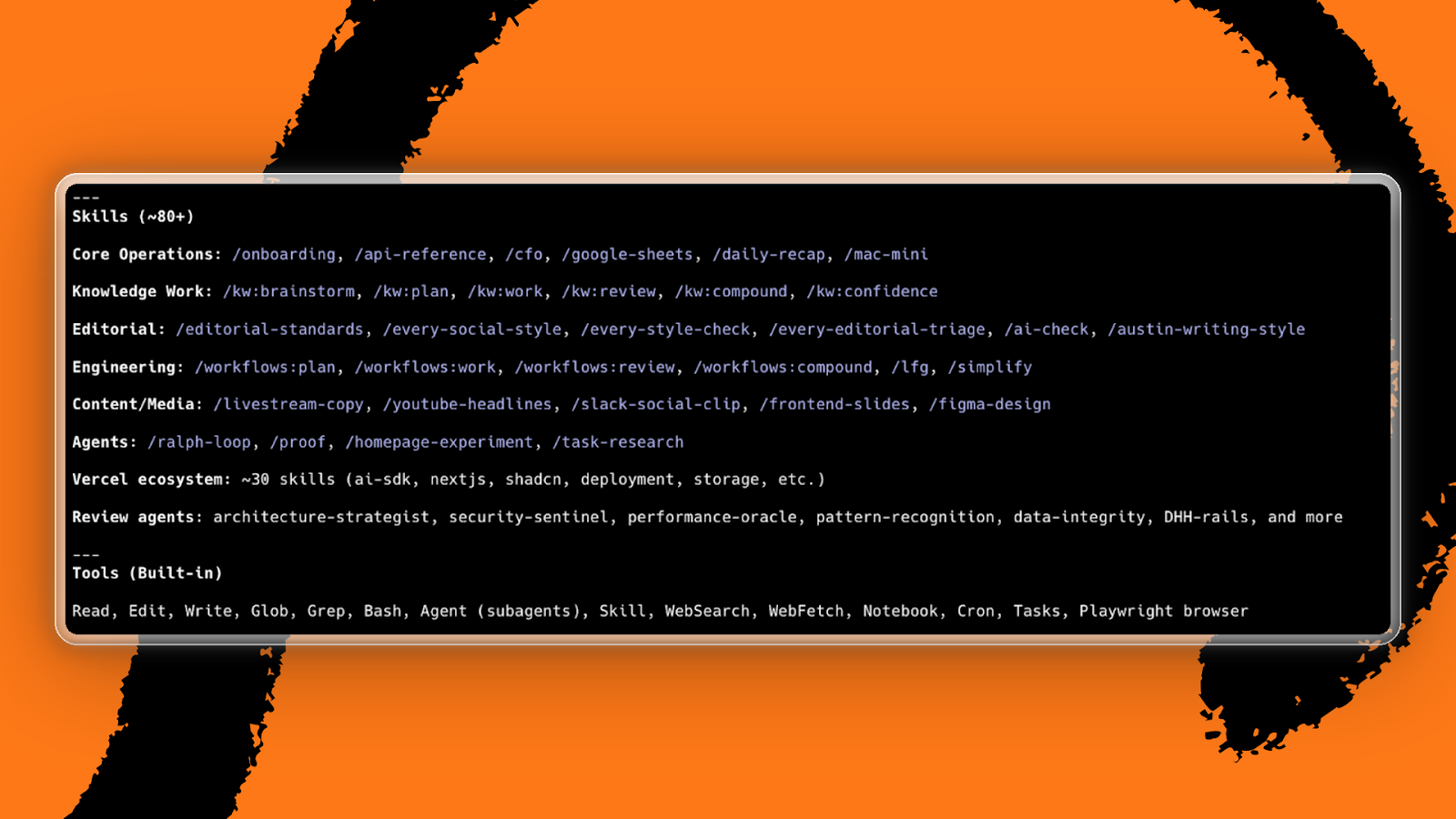
Montaigne lives in Claude Code on my terminal and as an OpenClaw bot on Slack. It has access to everything I use for growth work, including Stripe, PostHog, Slack, Notion, Figma, the full Every product suite, email, and calendar. It also has knowledge layers built on context about the business and a bench of skills for repeat workflows, giving the agent the tools to use that access with tremendous power.
Three weeks of playing
I could not have built Montaigne without first playing around with Claude Code for weeks. When I first opened Claude Code over the holidays, I went straight to building things I was personally excited about: a cooking companion app trained on your personal style, and a version of Fandango for indie movie theaters so I could stop checking six different websites to see what’s playing locally.
Those projects are what got me hooked, but they’re also what taught me the most. If you ask, the newest AI models are genuinely good at teaching you what they can do. When I didn’t know how to scrape for showtimes, I asked. When something didn’t work perfectly, I asked for alternatives and bug fixes. When I needed to connect a database and set up Google OAuth, I had Claude Code do it, but I also asked how it worked and why.
I would rarely go 30 minutes without typing something like: “I’m truly so stupid. Walk me through this step by step.” Or: “Copy things to my clipboard exactly as you want me to paste them elsewhere.” Or: “No, stop, don’t do the easy fix, I want this to work long-term.”
I spent a year cooking in professional kitchens, and I had the same approach to learning there. If you try to follow a recipe exactly—measuring every ingredient, referencing instructions at each step—you’ll fall behind and fail as the dining room gets busier. But if you take the time to learn how layering flavors works and how to use your senses to know when something is properly cooked instead of relying on a thermometer, you start to shine.
After a couple of weeks in Claude Code, I started to feel less like I was blindly following a recipe and more like I was cooking with instinct. And as I saw what I could do with all of these connections and all of this knowledge, it became clear where to aim it next.
How Montaigne works
Montaigne started with a brain dump. I opened Monologue, our dictation app, and talked. Here’s how we define monthly recurring revenue. Here’s what matters in a campaign brief. Here’s what I mean when I say “trial.” Other times, I pointed the agent at our dashboards, our Notion hub, our meeting transcripts, and told it to go figure out how things work on its own. When it reported back, I audited what it found.
The connections part—giving the agent access to Stripe, PostHog, Notion, and everything else—is straightforward. If you’re not sure how to hook it up to your customer relationship management software or your meeting notes, just ask it. If the answer is too complex, tell it to slow down and explain the process one step at a time. I was applying the same approach I’d learned from my first experiments with Claude.
The context part takes more refinement.
Early on, when I asked Montaigne an MRR question, the numbers looked off. I had it explain to me in detail how it was calculating MRR. Turns out, it was pointing at a specific kind of ChartMogul-based definition that differs from how we account for active and past due paid subscriptions. I pointed it to where the real numbers live, and then told it to update its own instructions to rely on this as the source of truth. The fix took two minutes, and Montaigne has gotten MRR right ever since.
A campaign brief used to take days of fragmented, manual assembly. Now I record a voice note with my rough strategy, point Montaigne at the relevant data and knowledge, and it synthesizes everything into a draft in Notion. From there, Montaigne can spawn subagents to start executing the parts of the plan that don’t need me. The experience of working with Montaigne is like working with a thought partner well-trained on every aspect of the business. That keeps me fresh for the part of the job that requires my brain, because I’m no longer depleted by the time I get there.
The tension I didn’t expect
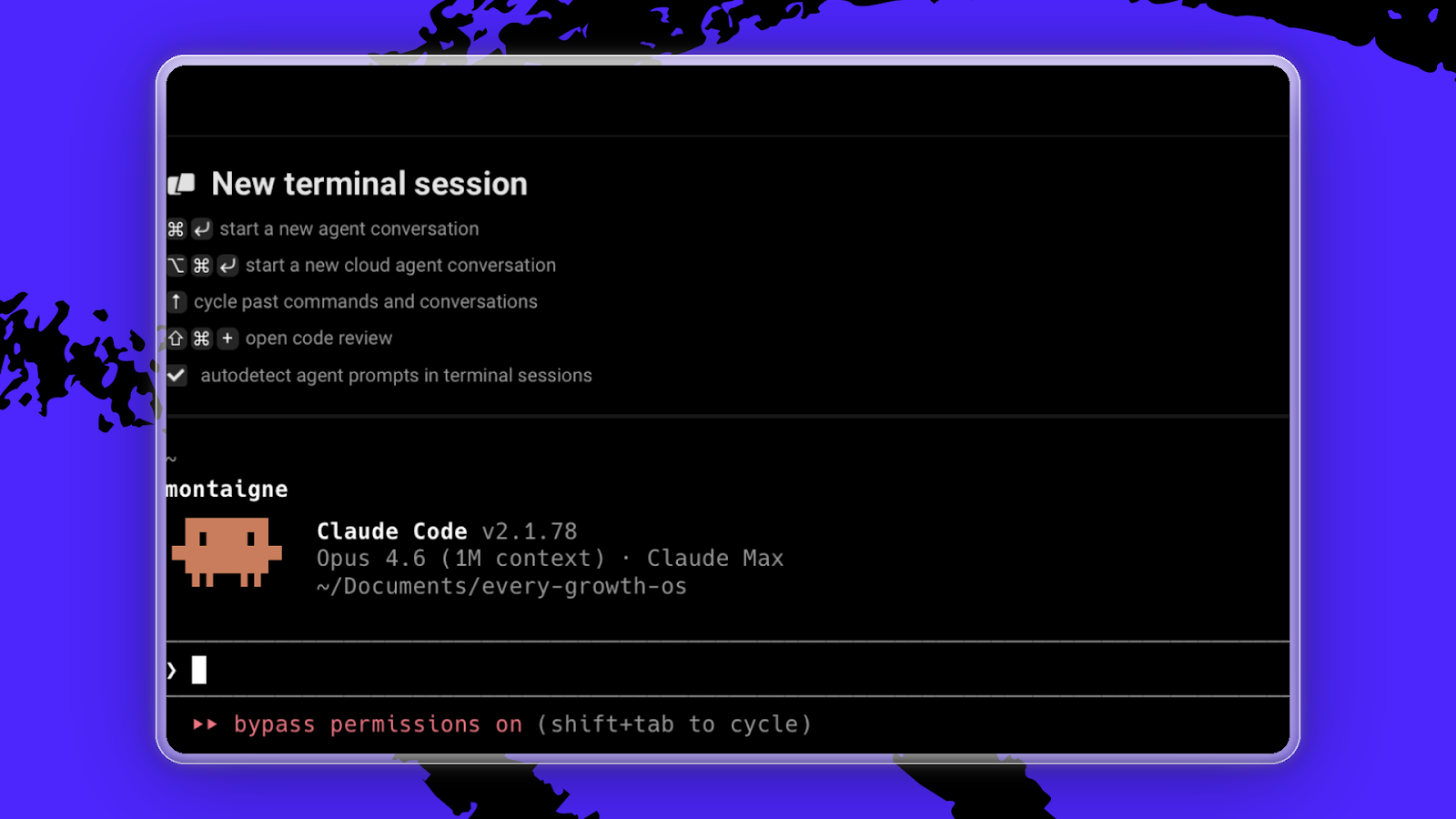
There are days when I’m so productive working with Montaigne that I can’t believe it’s real. I type “montaigne” into my terminal, and a Claude Code session opens with the project loaded. I’m working in seconds.
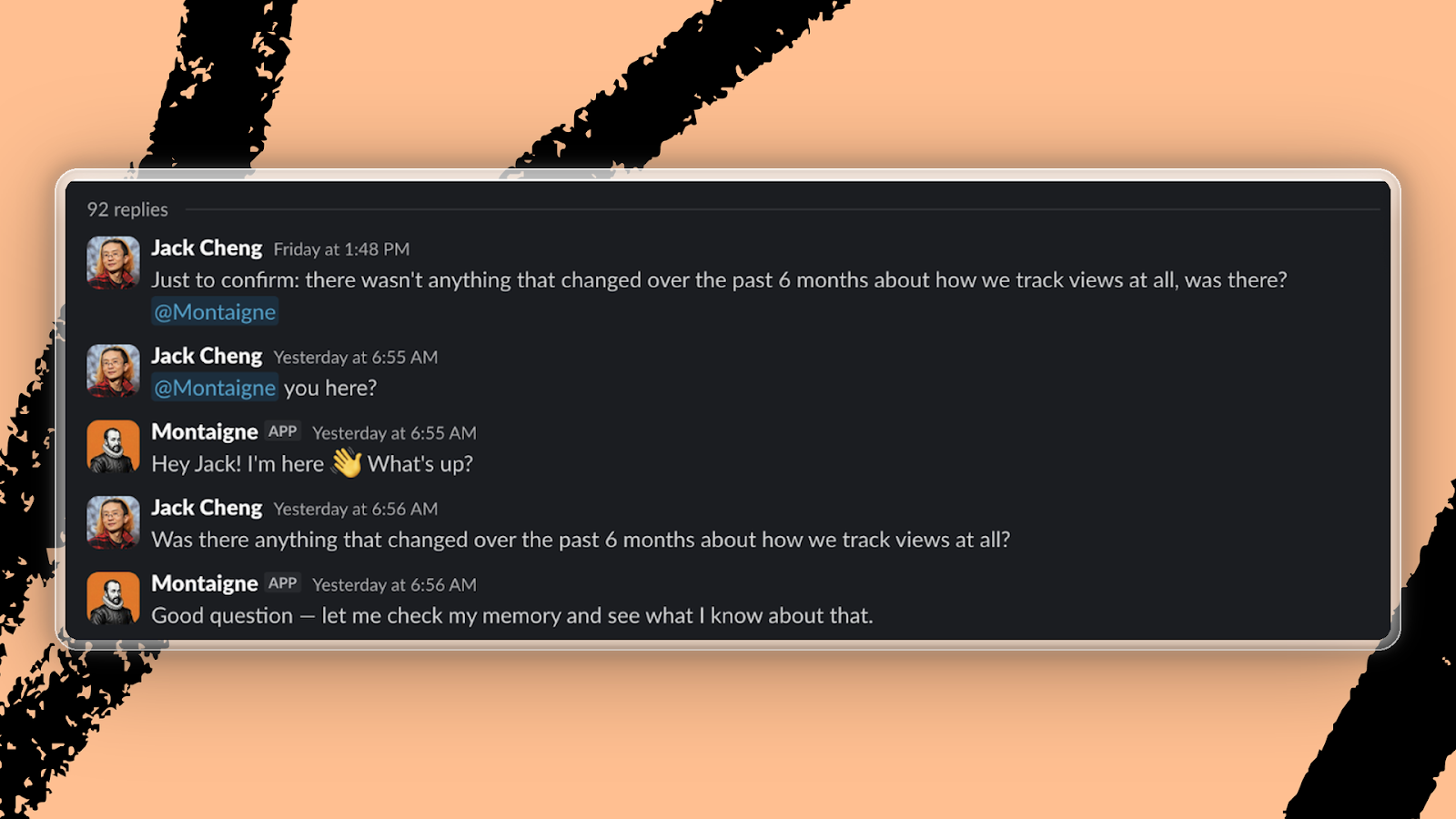
I also had Montaigne read all of the OpenClaw architecture documentation and then migrate himself into an agent that lives in our Slack workspace. Now, anyone on our team can tag Montaigne into a conversation. It creates briefs, answers data questions, ships landing pages, and generates short-form social videos.
The problem has become how I spend my time.
I could make that landing page, or I could perfect the skill inside of Montaigne that generates landing pages for me. Sometimes it genuinely is better to spend the day making the system better rather than using it. But it’s easy to look up five hours later and realize I still don’t have anything usable shipped, and I’ve only improved the system by five percent. I think a lot of people are feeling some version of this right now. Working on the system is seductive because it feels like progress, but you can end up in a frustrating loop while ignoring the real work at hand.
I don’t have a perfect answer for this yet. The balance between building and doing shifts every week, and I still lose entire days to updating Montaigne. But when everything feels out of whack, I’ve found a pretty helpful solution. I close every other window and tab on my computer, go to Montaigne, and tell it, “Let’s knock out everything left on my to-do list, one-by-one. Spawn subagents to start making progress on other tasks in the background while we handle the top priorities. Tell me where you think we should start.”
A few hours later, I’m back on track.
Try the compound knowledge plugin that powers part of Montaigne’s workflow.
Austin Tedesco is the head of growth at Every. Previously he ran business development at Substack and NBA subscription strategy at ESPN. You can follow him on LinkedIn. To read more essays like this, subscribe to Every, and follow us on X at @every and on LinkedIn.
We do AI training, adoption, and innovation for companies. Work with us to bring AI into your organization. Discover Every’s upcoming workshops and camps, and access recordings from past events.
For sponsorship opportunities, reach out to [email protected].
Help us scale the only subscription you need to stay at the edge of AI. Explore open roles at Every.
The Only Subscription
You Need to
Stay at the
Edge of AI
The essential toolkit for those shaping the future

"This might be the best value you
can get from an AI subscription."
- Jay S.
 Every Content
 AI&I Podcast
 Monologue
 Cora
Cora
 Sparkle
 Spiral
Join 100,000+ leaders, builders, and innovators

Email address

Already have an account? Sign in
What is included in a subscription?
Daily insights from AI pioneers + early access to powerful AI tools



 Front-row access to the future of AI
 In-depth reviews of new models on release day
Playbooks and guides for putting AI to work
Prompts and use cases for builders
In-depth reviews of new models on release day
Playbooks and guides for putting AI to work
Prompts and use cases for builders
In-depth reviews of new models on release day
Playbooks and guides for putting AI to work
Prompts and use cases for builders
In-depth reviews of new models on release day
Playbooks and guides for putting AI to work
Prompts and use cases for builders
 Bundle of AI software




 Reviews of new AI models on release day
Comments
Don't have an account? Sign up!