


A $500 Pro plan
A $500-a-month tier with OpenAI’s highest usage limits and exclusive access to Astra Ultrafast in ChatGPT Work and Codex

With 20-plus launches, here are the five that matter
OpenAI’s DevDay just kicked off, and we’ve got the rundown of the 20-plus(!) products and features the company announced. Here’s what matters, what it means, and what I learned from my hands-on testing.
OpenAI wants ChatGPT to become your operating system for work—documents, slides, and agents, all in one place on your computer. It also wants to let developers and startups build businesses on top of it.
Five announcements from today show what that looks like:
OpenAI is also introducing a model called Sol 6.1 (Astra-powered, but cheaper), Ultrafast inference (250 tokens per second), a $500 Pro plan with much more usage, and more. The number of releases is itself part of the story: I’ve been to every Dev Day since Dev Days began in 2023, and this is a far greater number of new products than it has ever had by my unofficial count.
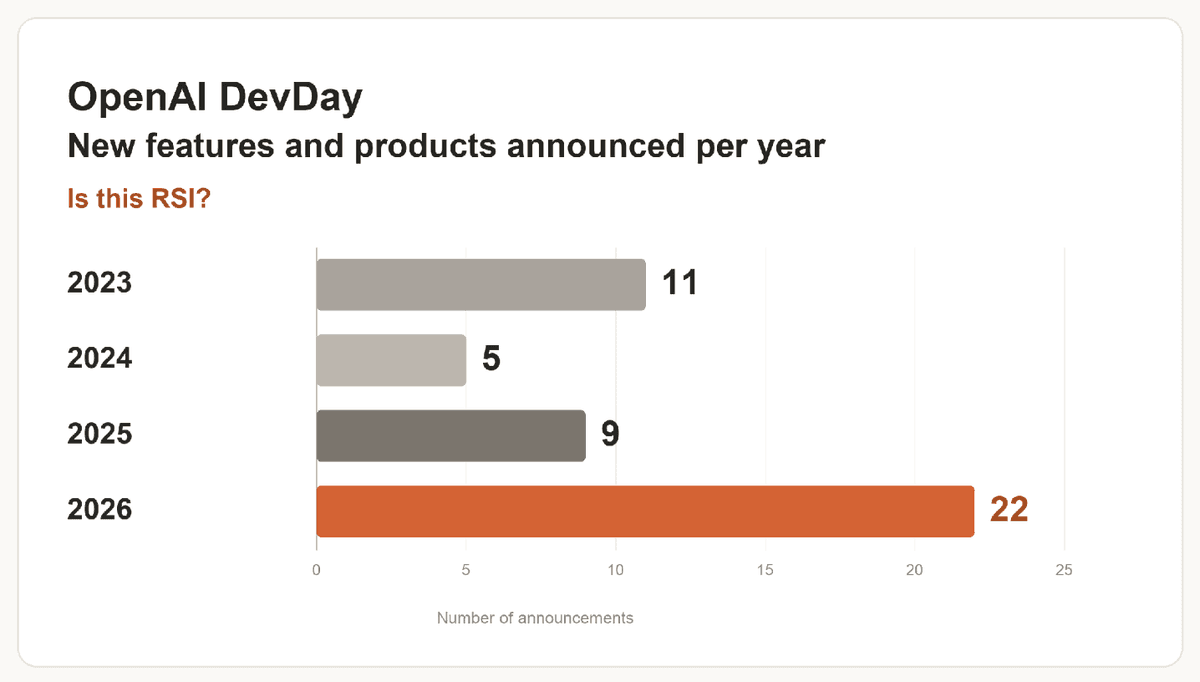
I like OpenAI’s big ambitions, but a vision so comprehensive also requires superior execution. In testing, Dots has become the main way I use ChatGPT, but it’s also been buggy and sometimes frustrating (more later). Space is better and seems to be an easy drop-in replacement for my old document-editor Proof (RIP). OpenAI is moving fast—and with coding agents, it can ship faster than ever—but adding so much at once risks losing the simplicity and coherence that made Codex excellent in the first place.
Here’s everything OpenAI announced and what it means:
Dots are OpenAI’s always-on agents built into ChatGPT. They’ll look familiar if you’ve used OpenClaw, Muse, Instinct, or Grok Bots. (The visual identity is similar to Muse and Grok Bots.)
Your Dot sits in the redesigned ChatGPT sidebar right below the “New chat” button:
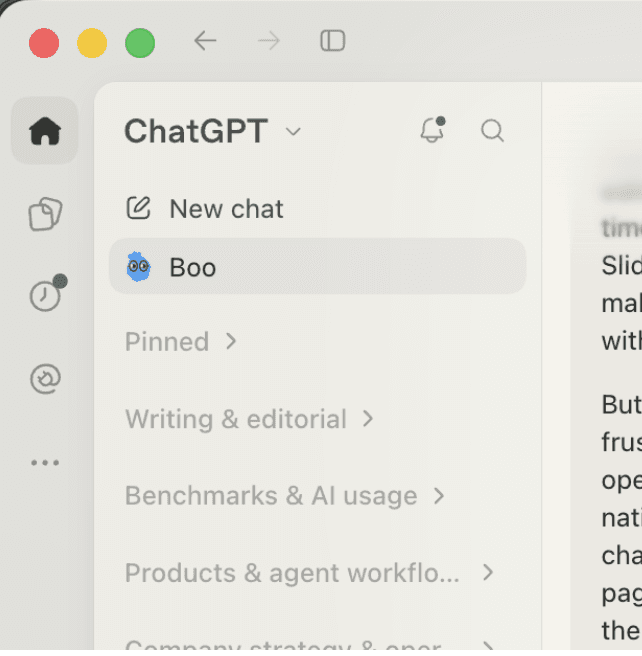
Its own cloud computer lets it work when your laptop is closed and act proactively on your behalf. You can talk to it by typing or call it on the phone. When it’s working, it changes the way I use ChatGPT: I interact with Boo (my Dot’s name), and Boo orchestrates ChatGPT threads, reads my email, uses Slack, and more. It automatically filters incoming Slack requests and emails so I can quickly triage items without opening my inbox. When I was rescheduling a flight, Boo warned me that my new flight time would conflict with a meeting request from Slack that I hadn’t read.
That’s the promise: an ongoing agent that filters what needs my attention and acts proactively on my behalf, in one long-running chat thread.
But the version I tested over the last few days was too buggy for me to recommend now. I had frequent issues with permissions and dropped messages, and my Dot was often unable to connect to the in-app browser. Dots also add a lot of complexity to the ChatGPT experience: I found my Dot and me both getting confused about whether it should work on its own computer, in the in-app browser of my main thread, or in a separate ChatGPT thread that it had kicked off and was orchestrating.
During testing, I found myself reaching for my Dot over starting new Codex threads, so it has definitely become a habit despite the frustration. But unless you love new things with rough edges, I’d recommend waiting a week or two to try it. OpenAI will have solved a lot of these paper cuts by then. If you’re already deep into Grok Bots, Muse, or Instinct, it’s probably not worth switching unless you’re also a big ChatGPT or Codex user.
Space is a Google Drive–like place inside ChatGPT where you, your Dots, and your team can organize and work on files together. OpenAI is also introducing native apps for documents, spreadsheets, and slides that you can use inside ChatGPT and with Space. It’s an agent-native document suite: Anything you can do in a document, your Dot can do. It’s meant to replace tools like Google Docs, Microsoft Word, and Notion. I wrote this Vibe Check in my Space:
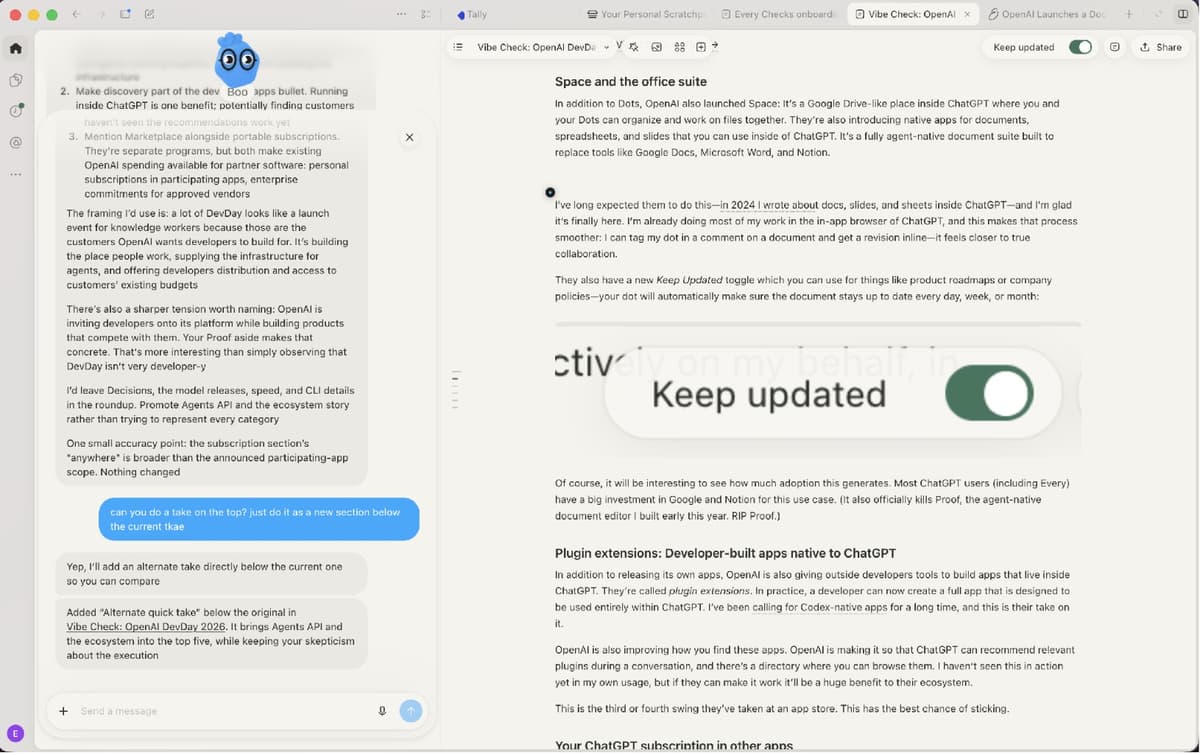
The obvious win is that you stop switching windows between ChatGPT and another app like Notion while you write. The less obvious one is speed. When a Dot builds a document through its browser in Google Docs, the edits practically crawl in, because Docs wasn’t built for agents. Native documents don’t have that lag. You can tag your Dot inside the document itself instead of going back to the chat to tell it to check the file.
I’ve long expected the company to do this—in 2024 I wrote about the potential for documents, slides, and sheets inside ChatGPT—and I’m glad the product is finally here. I’m already doing most of my work in ChatGPT’s in-app browser, and this makes that process smoother: I can tag my Dot in a comment on a document and get a revision inline as I’m working. The back-and-forth feels more like collaboration.
There is also a new “Keep updated” toggle that makes sure your Dot automatically keeps a document fresh—useful for evolving artifacts like product roadmaps or company policies.
The challenge is switching costs. Most ChatGPT users (including Every) already do all their collaborative work in Google and Notion.
In addition to releasing its own apps, OpenAI is giving outside developers tools called “plugin extensions” to build apps that live inside ChatGPT. A developer can now design and build a full app that runs entirely within ChatGPT. I’ve long called for Codex-native apps, and this is the company’s take on it: Developers can now build software for both you and your agent, right inside ChatGPT. You get an interface when you want one, and the agent can take over when you don’t—without either of you leaving the conversation
OpenAI is also improving how you find these apps. ChatGPT will soon be able to recommend relevant plugins during a conversation, and the app will include a directory where you can browse them. I haven’t seen this in action yet and couldn’t build a test app during the preview period, but if OpenAI can help developers reach users inside ChatGPT, the whole ecosystem will benefit. More developers will build apps for it, and users will have more useful tools to choose from.
This is the third or fourth swing OpenAI has taken at an app store—eventually it will make one that works.
OpenAI is letting you bring your ChatGPT subscription into partner products. If you pay for Plus or Pro, you can use OpenAI’s models in participating apps like coding agent Devin, with that usage counting toward your existing ChatGPT plan limits.
OpenAI says it’s starting with about 15 partners, and you’ll be able to control each app’s access and usage.
I’ve predicted that AI subscriptions will look like cellphone data plans: You pay for one, then choose which apps to use it in. OpenAI is the first major lab to take this step. Now, third-party software makers like Every can focus on making great tools for humans and agents without worrying about whether a token bill will bankrupt us. It’s also a better deal for users: You can use your subscription anywhere.
The Decisions API is OpenAI’s answer to Jev, the model we recently described as a “smart if-then statement.” You give the Decisions API context and a fixed set of answers, and it picks one. That could mean deciding whether an email needs a reply or which button an agent should click next. OpenAI’s version accepts images as well as text.
Our early testing has been promising, though the winner depends on the use case. On a text-only replay of computer tasks, senior editor Jack Cheng found that Decisions picked the correct control in 76 of 78 scored steps versus Jev’s 73, and typically responded in 230 milliseconds versus 500.
General manager of Cora Kieran Klaassen saw results favoring Jev. On a test classifying conversation threads, the two were effectively tied on accuracy, but Jev’s median response time was 161 milliseconds versus Decisions’s 309.
OpenAI is previewing Decisions today, with a launch expected in a few weeks. Pricing hasn’t been announced. If the Decisions API is cheap enough to use for thousands of these little decisions, I think this could be one of DevDay’s biggest releases.
A $500-a-month tier with OpenAI’s highest usage limits and exclusive access to Astra Ultrafast in ChatGPT Work and Codex
A premium speed tier for GPT-6 Astra. OpenAI says it runs at 250 tokens per second—and the demos I saw were mind-blowing, but also wallet-blowing. It’ll burn through your usage fast.
A new model Sol that offers near-Astra performance at one-fifth the cost.
Developers can build on the system that powers Codex, including agents working together, finding and calling tools, and using a computer. OpenAI runs the infrastructure.
Reusable development environments with shared settings and permissions, plus Codex’s desktop interface on the web. You can leave work running in the cloud and check in from your computer or phone.
The terminal app gets voice chat, a view for tracking agents, built-in worktrees for keeping coding tasks separate, and better prompt editing and session resumption.
A plugin for investigating vulnerabilities and proposing fixes in GitHub repositories. It can scan on demand, on a schedule, or when new commits arrive, with access to OpenAI’s security-focused Daybreak Blue models.
Enterprise privacy features combining Zero Data Retention with Private Safety Processing (i.e., customer content isn’t retained, and safety checks are performed without exposing that content beyond the protected environment), plus a preview of Private Inference—AI processing in a secure, verifiable environment.
Teammates can use a shared Site with their own connected data and permissions—available on Business, Enterprise, Healthcare, and Education plans.
A rebuilt submission process with clearer feedback for developers.
A beta that lets eligible enterprise customers put part of their existing OpenAI spending commitments toward approved partner software, starting with 32 partners.
Every six to 12 months, it feels like the models get good enough to spur a change in product form factor. GPT-3 enabled chat in a browser. Then, around Sonnet 3.5, we got coding agents in a terminal. Then, around GPT-5.3, we got desktop apps for managing several agents at once.
Now, with Astra , and Opus 5.5–level models, we’re moving toward one persistent agent that knows our work, keeps track of what’s changed, and brings in other agents as needed. This is a form factor that’s been obviously coming since the OpenClaw craze eight months ago, but now the models are good enough that big companies including Meta, X, and now OpenAI are getting in the game.
I find the pace of the updates exhilarating, and manually starting and managing individual Codex or ChatGPT threads already feels a little archaic. But I am also a little tired and confused. Feature velocity is great when it feels coherent, but even a power user like me has a lot to figure out, and it doesn’t all work yet.
I’m excited to keep using these products. I’d be even more excited if the next time I opened ChatGPT, there was less for me to figure out.
Dan Shipper is the cofounder and CEO of Every, where he writes the Chain of Thought column and hosts the podcast AI & I. You can follow him on X at @danshipper and on LinkedIn.
We use analytics and advertising tools by default. You can update this anytime.