An Executive’s Guide to Implementing AI
A playbook for building organizational capability from Every’s consulting team
If you read nothing else, here is the loop:
Get fluent → Assign AI champions → Pick one painful workflow → Build to 95 percent → Scale what works
Get fluent. Use the tools yourself before directing anyone else to use them. Know what your company has access to, what the policies allow, and what the friction feels like. If you haven’t built something with AI in the last 30 days, start there.
Assign AI champions. Pick operators with bandwidth. Give them protected time (at least two days per month), a clear mandate, and enablement. They are responsible for taking workflows from “works in a demo” to “works in production.”
Pick one painful workflow. Let your champions choose. They know what work is most tedious and worth automating. Start with something frequent, data-rich, and narrow enough to test in a week. You don’t need a full workflow mapping exercise.
Build to 95 percent. An automation that works 80 percent of the time is a demo. Real automation requires gold-standard examples, structured evals, human review gates, and a named owner who maintains it when the model updates. Once you have a skill that works reliably 90-95 percent of the time, you’ve gotten value from AI.
Scale what works. This is where the champion role is key. Run show-and-tells. Train adjacent teams on proven workflows. Kill what doesn’t work and expand what does. One visible win creates pull across the organization.
This guide turns that loop into a 60-day plan for executives, with checklists, and rubrics drawn from Every’s consulting work with dozens of top companies.
SUBSCRIBE
Get our essential AI guides
Every keeps you at the edge of AI. Start with our best agent-friendly guides right in your inbox.
An executive’s guide to implementing AI
Sitting across from the chief operating officer of a health tech company earlier this year, I watched her name a problem many executives are feeling but few say out loud.
“Our junior employees are probably much more native with this technology,” she said. “And we need to make sure we’re sticking with it. Makes me feel like a dinosaur to say that, but it’s true.”
Confessions like this come up regularly during our executive training sessions: Leaders aren’t working directly with AI on sophisticated tasks, even as they’re guiding planning decisions about the technology. They know they should spend more time learning the tools, but they haven’t committed to it yet. That’s understandable; executives are incredibly busy. But what we see in our sessions is that leaders who haven’t gotten their hands dirty don’t clearly understand the practical opportunities and challenges of AI. That health tech executive’s admission sparked an important conversation about how a coordinated company-wide approach to AI implementation starts with executive AI fluency—but doesn’t stop there.
We see this pattern in every engagement we run in our consulting work. Over the past two years, we’ve trained thousands of people at companies including the New York Times, Ripple, Headway, and Thumbtack, and at investment firms managing over $100 billion in assets. We’ve done the workshops and watched what changed six months later. AI usage in the workplace is now widespread, but it’s an altogether different ballgame to build organizational capability that truly realizes financial gains.
McKinsey defines AI high performers as organizations that report both significant value from AI and more than a 5 percent impact on earnings before interest and taxes (EBIT). These companies are nearly three times as likely as others to have fundamentally redesigned their workflows, but they remain a minority: Only 6 percent of the nearly 2,000 organizations surveyed met the criteria for success.
Of course, no outside firm can implement AI into your company for you. But we can provide a playbook for how to build organizational capability that endures: leaders that work directly with the tools, empower the right champions, and build the muscle across teams for what great looks like, one painful workflow at a time. By the end of this guide, you’ll have no excuse not to be one of them.
Riding the waves of AI adoption
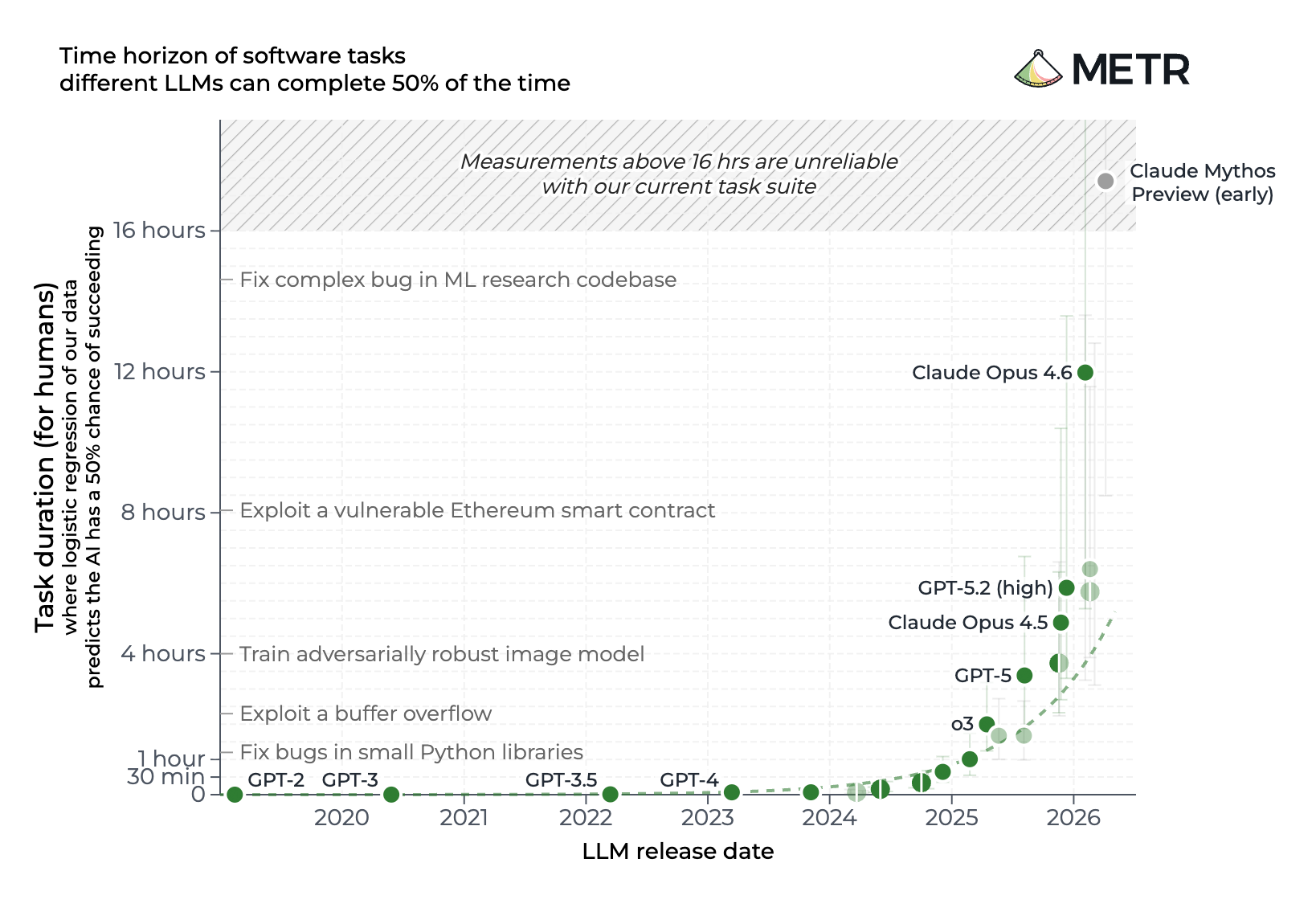
In three short years, AI has gone from performing party tricks to completing an entire day’s worth of human work.
In 2022, models could answer basic questions, tasks that take a human four seconds. By mid-2023, GPT-4 could handle tasks that take humans about six minutes. By late 2024, o1-preview was tackling hour-long work. And by late 2025, Claude Opus crossed into tasks that take humans 10 hours or more. That progression has been exponential and transformed what “AI implementation” means for companies again and again.
Here are the three rough waves of AI adoption since ChatGPT’s launch:
- The license wave (late 2022 to early 2024): Companies bought licenses for ChatGPT Enterprise, Claude, and Microsoft Copilot in the hopes that they would increase employee productivity. Some employees found value in using the tools to draft emails, summarize documents, and conduct research, but gains were uneven and individual.
- The prompt wave (early 2024 to mid-2025): Companies ran prompt-training sessions, created internal prompt libraries, built resource documents, and encouraged teams to experiment with custom GPTs. That helped move AI beyond pure individual tinkering, but it rarely created durable organizational change—custom GPTs and libraries often had no owner and no way to evaluate their results.
- The implementation wave (mid-2025 to now): Following its launch in research preview in February 2025, Claude Code helped shift enterprise adoption to where we are now: away from chat-based AI and prompt libraries and toward AI agents that can increasingly be configured to perform longer, multi-step tasks within defined constraints. Prompt libraries are giving way to skills libraries: reusable workflows with instructions, examples, reference materials, scripts, evaluation criteria, and named owners. Suddenly, non-technical people can build sophisticated automations in tools like Claude Cowork; implementation isn’t just for engineers anymore.
The METR chart shows just how far the technology has progressed, but we’ve seen that many organizations implementing AI haven’t kept up with the sea change.The bottleneck for AI adoption has moved from model capability to chart shows just how far the technology has progressed, but we’ve seen that many organizations implementing AI haven’t kept up with the sea change. The bottleneck for AI adoption has moved from model capability to organizational capability. On our end, we’ve fundamentally altered our trainings to support executives and teams in this new era. For instance, we’ve retooled our sessions on prompting into workshops on setting up agents, skills, and workflows that can be owned, tested, and maintained. We’re working with executives on building that organizational muscle and turning raw model capability into reliable, repeatable workflows.
We know it’s making a difference. One investment firm we worked with now runs 100-plus agents across the organization through Copilot Cowork. At an e-commer ce company client, Claude’s Opus handled financial variance analysis that previously took a week. After working with us, a private equity firm decided to hire full-time AI champions to continue their AI implementation process.
Here are the five steps we’ve found that can carry you and your company into the next era, too:
The Only Subscription You Need to Stay at the Edge of AI
Start shipping agent-native products with Every.
Step #1: Get fluent
AI implementation starts with executive fluency. That doesn’t mean executives need to become day-to-day AI builders. What’s important is that you spend enough time with the tools to understand what you’re asking your teams to do. At one large media and data company we worked with, we saw that executives responsible for reviewing internal AI initiatives had never built with the tools themselves. All their previous initiatives had failed. It was easy for them to project what an AI agent could do for their business. It’s much harder to wrestle with what building with AI involves: the data the agent needs, the systems it can access, where it might fail, how much human review it requires, and who will maintain it after the first demo works.
Get your hands dirty
In our executive sessions, we push leaders beyond using AI as a chat interface and ask them to build a custom skill, agent, or automation themselves. The exercise quickly surfaces all the practical constraints that determine whether the use of AI can create value for a specific workflow.
Once you start to build for yourself as an executive, the conversation moves from abstract enthusiasm to practical questions: which connectors need to be enabled, what data can be accessed, and whether existing information technology policies match the company’s AI ambitions.
Understanding the roles and perspectives of IT and security are a critical part of AI fluency. The goal isn’t to bypass guardrails; regulated companies may have good reasons to restrict file uploads, block certain tools, or limit which data can be passed into a model. But as a leader, you need an ongoing dialogue with IT and security teams to take into consideration what tools are available, how they connect, what data can move where, and what trade-offs the company might be making. If you’ve never built under those constraints, you may misread the resulting low adoption as employee reluctance rather than an access problem.
Define your standard of excellence
Fluency also exposes whether leaders can define what good work looks like. In one executive session, we worked with a leader who had to prepare metrics for the company’s board. The process required pulling data from Snowflake and took many hours each quarter.
On the surface, this looked like a perfect candidate for an AI skill. But as the team started building, a different issue emerged: The executive could not clearly articulate what “excellent” looked like.
A skill is a set of reusable capabilities that define how an agent performs tasks; in order to reliably reproduce a workflow, it needs instructions, examples, reference materials, and a clear picture of what good and bad output look like. Of course, the same is true of people. If you cannot explain your standard of excellence to your chief of staff, you’ll certainly struggle to explain it to an AI system.
This is why as a leader, you’re better positioned to use AI than you may think. High-performing executives already know how to set direction, allocate resources, define standards, and judge whether work is good enough. Executives do not need to have all the answers. But you do need enough AI fluency to ask the questions that will help you decide where AI belongs in your company’s strategy:
- What can AI see inside our company?
- What can it do?
- Where are the constraints?
- Which workflows are painful enough to prioritize?
- Who will own the systems we build?
- How will we know whether they work?
Step #2: Assign AI champions
Once you understand what AI can and cannot do, the next step for executives is to assign ownership of the projects to specific individuals, known as AI champions.
Champions shepherd a project from initial idea to completion by experimenting with and iterating on workflows, teaching others what success looks like, and gathering support across the organization for AI implementation. Their job is to decide what gets built, what gets maintained, what gets improved, and what gets killed.
Champions typically have three qualities: curiosity, a people-oriented mindset, and the authority and time to do the work. As a leader, your job is to choose the best people for the job. In our consulting work, we train these champions to lead adoption across their departments.
Find the people who ask questions
AI champions do not need to be the most technical people in the organization. They don’t need to be engineers or have experience using AI for years.
They do, however, need to be curious. Great champions constantly ask questions, probe how processes work, and want to understand “what excellence looks like” for different tasks and functions.
Truly curious people also tend to be comfortable asking for help from colleagues and from AI—a skill we believe will define the next era of work. Successful AI champions treat AI as a partner rather than a one-shot magic button. And AI rewards people who are willing to admit what they do not know, break a problem down, ask better questions, and keep iterating until they get somewhere useful.
Great champions care about people
The best AI champions also understand that AI implementation is fundamentally a people issue — and they care about the people they work with.
AI champions build and maintain tools, but they also help colleagues change how they work. To do that well, champions need to understand the pain points inside their function. They need to know which tasks drain time, which processes frustrate people, and which handoffs create errors. That’s why the strongest champion is someone who’s close to the workflow the company is solving—a marketer who knows where campaign analysis gets stuck, for example, or a customer support lead who understands ticket triage.
They also need to be great communicators. Once a skill or workflow is ready for wider implementation, the champion has to explain it to the rest of the team, collect feedback, and help people understand how to use it.
Give champions time and authority
Champions need to be given the authority to make decisions and the time to be able to execute. This is where many AI programs fail. Executives identify enthusiastic people and ask them to help with AI on top of their day job. The result: The work gets squeezed into evenings, deprioritized during busy periods, and sometimes abandoned altogether. Enterprise AI implementation won’t work if it’s pitched as an informal side project.
What champions need is protected time—at least two days a month, in our experience—and a clear mandate. They should be responsible for a small number of workflows in their domain, with enough authority to make decisions about how those workflows are documented, tested, and maintained. They should also have a clear escalation path when they need support from IT, security, leadership, or another function.
The exact structure will vary, of course. A large company may need an ambassador model, with champions distributed across major functions. A mid-sized company will likely need one or two department champions per team. For private equity firms or holding companies, dedicated fellows who move between the firm and portfolio companies could be the most effective.
In short, an AI champion should:
- Own one to three workflows in their domain
- Maintain the documentation for those workflows
- Build or manage eval sets
- Collect feedback from the team
- Update skills when tools, models, or processes change
- Report on time saved, quality improved, or errors reduced
- Have protected time to do the work
Step #3: Pick one painful workflow
Once you have champions, it’s time to pick a workflow to start with. This is where most executives make the mistake that derails the process: They begin with the biggest, most visible problem at the company.
We’ve seen executives want to automate the creation of the board deck, rebuild project management, or create an agent that solves a hairy cross-functional process across multiple systems. But even experienced AI builders make the mistake of starting too big. At Every, one of the team’s first instincts was to automate project management for our consulting business—a broad, messy workflow touching multiple people, systems, and decisions.
But AI implementation works better when you resist the urge to build the “whole body” at once. Instead, start with one artery of the workflow, a narrow, painful piece of the puzzle that can be tested, improved, and then trusted before expanding from there. Good candidate workflows are often unglamorous—categorizing support tickets or summarizing vendor updates—but are frequent enough to act as valuable test cases. If you’ve chosen your champions well, you can rely on them to find the most painful workflow to start with. They may even have experienced that pain firsthand.
To locate the best workflow among a good group of candidates, score them against the following criteria:
Frequency: Does this happen daily, weekly or monthly?
Pain: How much time, frustration, or error does it create?
Data availability: Is the required information already digital and accessible?
Risk: What happens if the AI gets it wrong?
Ownership: Who currently does this manually?
Evaluation clarity: Can we tell whether the output is correct?
Maintenance burden: How often will the workflow need updating?
Step #4: Build to 95 percent
Once you’ve chosen your first workflow (or your champion has with your blessing), it’s time to start building. This is often the moment when one of the biggest expectation gaps in AI implementation emerges. A team can often get an impressive first version of something working in minutes. Whether it’s a customer service workflow that categorizes the first 20 tickets correctly, or a vendor update that manages to capture a pricing increase or a new security requirement, that jump from zero to something workable can feel like magic.
But typically, what’s happened is that they’ve built a demo, not a usable product that can be rolled out anywhere. Turning that demo into a tool the team can rely on—going from 60 percent to 95 percent—requires much more work: examples, evaluation, feedback, human review, and maintenance. And champions and executives will have to work in tandem to get there.
Set product standards
Executives should act like tastemakers here, setting the standard for what a useful workflow looks like and where human review belongs, and deciding how much time the company is willing to invest in the outcome. Champions can then use those standards to build. They collect examples and evaluation metrics to test the workflow’s output, gathering feedback that informs the finished product.
Automation is a lie
Building to 95 percent also means accepting that any AI workflow is a never-ending process. Models update. Company processes shift. Team standards change. New edge cases appear. A skill that worked last month may need to be adjusted this month. This is where evals—structured ways to test whether the AI is doing its job correctly—come in.
Think of an AI agent less as a machine that runs forever and more as an employee you’re onboarding. You have to give it instructions, show it examples, correct its mistakes, and clarify what excellence looks like. Over time, it’ll become more useful, but only if it’s managed correctly.
For each workflow, create a simple table that asks:
- What real example should the workflow be tested against?
- What’s the current output of the AI agent?
- What’s the expected output of the AI agent?
- What errors is it making?
- What caused the error?
- Is a prompt or skill change required?
- What’s the result of the retest?
- Is human review required?
- Who owns this workflow?
- What’s the review cadence of the tool?
Step #5: Scale what works
The next step sounds obvious, but you’d be surprised how many executives get it wrong: Only scale what works. This is important from a resource perspective, but it’s also key for internal adoption. While many executives begin with a company-wide mandate that everyone start using the tools, the better path is to foster one visible win by choosing the right champion, workflow, and standards, and building from there.
When a team experiences an AI workflow that solves a real and painful problem, AI stops being an abstract productivity promise and becomes a practical solution. That experience creates pull across the organization, and other teams start asking what could work for them.
But scaling doesn’t mean copying the same workflow everywhere. Most workflows are department-specific. What works for finance may not work for marketing, for instance, and what works for customer support may not work for the product team. Once you have a winning workflow, it’s your job as a leader to decide whether it should stay team-specific, become a shared skill, or be sunsetted.
But regardless of how specific its impact is, your first successful workflow can create reusable components across the company by establishing how to describe processes, document standards, and define good output. Those practices can be adopted by any team.
Before scaling a workflow, ask:
- Has it solved a real pain point?
- Has it been tested against real examples?
- Is there a named owner?
- Is there a review process?
- Are the risks understood?
- Can the team explain how and when to use it?
- Is there a feedback loop for improvement?
- Should this become a shared skill, stay team-specific, or be killed?
A 60-day plan for leader-enabled AI implementation
Weeks 1–2: Get fluent
As executives, you should dedicate time to building with AI tools and mapping access, data connectors, and security constraints. Get your IT and security teams in the room to ask questions so you can understand the tradeoffs between AI implementation and security.
Weeks 3–4: Assign champions and pick workflows
Select champions in each relevant function, and give them a clear mandate and protected time to identify a short list of painful workflows.
Weeks 5–7: Build and evaluate
Work with your champions to select a starting workflow to build into a skill, agent, or automation by defining good output, building eval sets, and testing workflow to identify failure modes.
Weeks 8–9: Scale or kill
If the workflow works, train the rest of the team to use it. Then, instruct champions to run a show-and-tell for adjacent teams to help decide whether the workflow should become part of a shared skills library or remain team-specific. Make a final call on whether the workflow should be scaled, and move on to the next one.
By the end of 60 days, it’s unlikely you’ve transformed your entire company. But you will have something valuable: at least one reliable workflow created by trained champions, a team on board with its implementation, and a repeatable process for scaling future AI work. (You would be surprised at just how rare this is. Most companies have a lot of prompts, tools, and automations that don’t get the job done.)
What we’ve learned
There is no simple shortcut to successful AI implementation. No single tool or model can solve every company’s problem, and no outside firm can implement AI for you, either.
From leading our consulting practice, I understand the time and commitment it takes to go through this implementation process. In January, I spent over 100 hours working closely with our internal AI champion, a forward deployed engineer (FDE) on our team, to define our own AI adoption. Now, I spend 10-15 percent of my time maintaining existing skills, providing feedback to agents and the FDE, and making decisions about where to apply AI and how the team should allocate time to these tools.
We now have a skill library that the business relies on and an agent that does the work of a full-time employee supporting project management, sales operations, and delivery. For us, that investment is worth it.
The health tech company from earlier learned that firsthand. When we started working with them, they were getting to grips with Claude Code. Now, the company is building its own internal AI infrastructure that’s tailored to how its employees work. They got there by building organizational capability through our five-step process.
As executives, it’s your job to take the lead on creating these systems. Now you have everything you need to get started, so it’s time to learn the tools, empower the right champions, choose the right pain points, and—most importantly—build.
Natalia Quintero is the head of Every Consulting.
Thanks to Tom Matsuda for editorial support.